

What Hardware Do You Need for 70B LLMs? VRAM, GPUs, and Quantization Explained
Learn the minimum hardware required to run 70B large language models locally. This guide explains VRAM requirements, GPU vs Apple unified memory, and how quantization makes running powerful LLMs possible on modern workstations.
A LEARNINGAI/FUTUREEDITOR/TOOLS
Sachin K Chaurasiya
3/20/20266 min read


Running a 70-billion-parameter (70B) large language model locally used to be something only large research labs could do. Today, improvements in quantization, GPU performance, and memory architecture have made it possible for developers and advanced users to run these models on personal machines.
However, running a 70B model is still demanding. The main limitation is memory, especially GPU VRAM. A full-precision model requires an enormous amount of memory, which is why most local setups rely on quantization techniques that reduce memory usage while keeping most of the model’s intelligence.
This guide explains the minimum hardware needed to run 70B models locally, focusing on VRAM requirements, GPU vs Apple unified memory, and how quantization changes the hardware equation.
Understanding the Hardware Demands of 70B Models
Large language models store billions of parameters that represent learned knowledge. Each parameter takes a certain amount of memory depending on its numerical precision.
Common precision levels include:
FP16 (16-bit floating point)
INT8 (8-bit quantized)
INT4 (4-bit quantized)
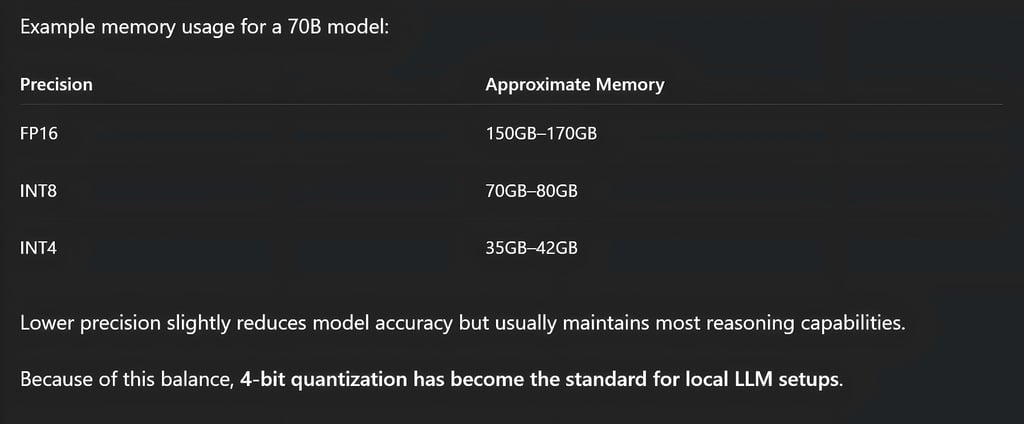
If a 70B model runs in FP16 precision, it can require roughly 150GB to 170GB of VRAM just to store the model weights and runtime overhead. That level of memory is usually only available on multi-GPU enterprise systems.
Because most people do not have access to that hardware, quantization becomes essential for running these models locally.
VRAM Requirements for 70B Models
Full Precision (FP16 / BF16)
Full precision keeps the model exactly as it was trained. This provides the highest accuracy but requires extremely powerful hardware.
Typical requirements include:
Around 150GB–180GB VRAM
Multiple GPUs working together
High-end workstation or data center hardware
These systems distribute the model across several GPUs so that each card holds part of the model. While this setup provides excellent performance, it is usually not practical for personal systems.
8-bit Quantization
8-bit quantization cuts memory requirements roughly in half while keeping most of the model's capabilities.
Typical requirements:
Around 70GB–80GB VRAM
Single enterprise GPU or multiple consumer GPUs
Possible setups include:
One GPU with 80GB VRAM
Two GPUs with 40–48GB VRAM
This configuration is still expensive but significantly more accessible than full precision.
4-bit Quantization (Most Common for Local Use)
Most local deployments today use 4-bit quantization, which dramatically reduces memory usage while preserving most reasoning ability.
Typical requirements:
Around 35GB–42GB VRAM for model weights
Additional memory for context and KV cache
This allows a 70B model to run on hardware such as:
One 48GB GPU
Two 24GB GPUs
Hybrid setups using GPU and system RAM
Modern 4-bit quantization methods usually maintain 95–98% of the original model quality, making them ideal for local inference.

Minimum GPU Hardware for Local 70B Inference
The GPU is the most important component when running large language models locally.
Entry-Level (Bare Minimum)
This configuration focuses on experimentation rather than speed. Typical specs:
GPU: 16GB–24GB VRAM
System RAM: 64GB
CPU: 8 or more cores
In this setup, part of the model runs on the GPU while the rest runs in system RAM. This method is called offloading. Performance is slower, but it allows people to run large models without enterprise hardware.
Practical Workstation Setup
For smoother inference with 4-bit models, a more balanced workstation is recommended. Suggested hardware:
GPU: 48GB VRAM
RAM: 64GB–128GB
CPU: 8–16 cores
Storage: NVMe SSD
A 48GB GPU can usually hold a full 4-bit 70B model, which avoids slow transfers between system memory and GPU memory. This significantly improves response speed.
Multi-GPU Consumer Setup
Another common strategy is using multiple consumer GPUs instead of a single enterprise card.
Example setup:
Two 24GB GPUs
64 GB RAM
Fast PCIe motherboard
The model is split between both GPUs. This setup often costs less than purchasing a single enterprise GPU with extremely large VRAM.
GPU vs Mac Unified Memory
Modern Apple Silicon systems introduced a different way of handling memory for large models.
Traditional GPU Architecture
In standard PC systems:
GPU VRAM and system RAM are separate
Data transfers between them can create bottlenecks
Advantages include:
Faster inference when the model fits completely in VRAM
Strong software ecosystem for AI frameworks
However, consumer GPUs usually have limited VRAM.
Apple Silicon Unified Memory
Apple chips use unified memory architecture, where the CPU and GPU share the same memory pool.
This means:
Models can access a very large memory pool
Data does not need to be copied between CPU and GPU
High-end Apple systems with 128GB to 256GB of unified memory can run very large models, including some 70B models.
Advantages:
Massive available memory
Very high memory bandwidth
Efficient architecture
Limitations:
GPU compute power is generally lower than top NVIDIA GPUs
Some AI frameworks still run faster on CUDA-based systems
Storage and System RAM Requirements
Running large models locally also requires strong system resources beyond the GPU.
System RAM
Recommended RAM levels:
Minimum: 32GB
Practical: 64GB or more
System RAM is used for:
Loading model files
Offloading model layers
Storing context windows and KV cache
Larger context sizes increase RAM usage significantly.
Storage Requirements
70B models are very large. Typical model sizes:
40GB–50GB for heavily quantized versions
80GB–150GB for higher precision versions
For best performance, models should be stored on NVMe SSDs. Faster storage speeds improve loading times and reduce delays when switching models.
Why Quantization Is Essential
Quantization reduces the precision of model weights so they take less memory. Instead of storing each parameter in 16 bits, quantization compresses them to smaller formats such as:
8-bit
6-bit
4-bit
experimental lower bit formats
This dramatically lowers memory requirements.

Realistic Minimum Specs for Running 70B Locally
For most people running local models in 2026, these configurations are the most practical.
Option 1: Budget Multi-GPU Setup
Two 24GB GPUs
64 GB RAM
8-core CPU
NVMe SSD
Option 2: Single Workstation GPU
48 GB GPU
64GB–128GB RAM
12-core CPU
Option 3: High-Memory Apple Silicon System
128GB–256GB unified memory
Apple Silicon GPU architecture
All of these setups typically rely on 4-bit quantization to run 70B models efficiently.
Running a 70B large language model locally is no longer limited to enterprise environments, but it still requires serious hardware planning.
The most important factors are:
VRAM capacity
Quantization method
Memory architecture
GPU performance
For most local developers and AI enthusiasts, the best balance today is a 4-bit quantized model running on either a 48GB GPU or dual 24GB GPUs.
As quantization methods improve and consumer hardware continues to evolve, running powerful models locally will become even more accessible in the coming years.
FAQ's
Q: Can a 70B LLM run on a single consumer GPU?
Yes, but only with quantization and optimization techniques. A typical consumer GPU with 24GB VRAM cannot load a full 70B model in normal precision. However, with 4-bit quantization and partial CPU offloading, it is possible to run the model, though performance may be slower. For smoother performance, a 48GB GPU or dual 24GB GPUs is usually recommended.
Q: How much VRAM is required to run a 70B model locally?
The VRAM requirement depends heavily on the precision level used. In full precision (FP16), a 70B model may require 150GB or more of VRAM, which usually means multiple enterprise GPUs. With 8-bit quantization, the requirement drops to around 70–80GB VRAM, while 4-bit quantization typically needs around 35–42GB VRAM, making it possible to run on high-end consumer hardware.
Q: What is the best quantization level for running 70B models locally?
For most local deployments, 4-bit quantization (INT4) is the best balance between memory usage and model performance. It reduces the memory footprint significantly while preserving most of the model’s reasoning and language capabilities. Many modern inference engines are optimized specifically for 4-bit models.
Q: Is GPU VRAM more important than system RAM for local LLMs?
Yes. GPU VRAM is the most critical resource for running large language models efficiently. If the entire model fits into VRAM, inference becomes significantly faster. System RAM helps when models are partially offloaded from GPU memory, but relying too heavily on RAM can slow down response times.
Q: Can Apple Silicon Macs run 70B models locally?
Yes, high-end Apple Silicon machines can run large models thanks to unified memory architecture. Systems with 128GB or more unified memory can load large quantized models and sometimes even higher precision versions. However, while Macs offer large memory pools, dedicated NVIDIA GPUs usually deliver faster inference speeds for AI workloads.
Q: What is the minimum RAM required for running a 70B model?
While the GPU handles most of the computation, system RAM is still important for loading models and storing context data. The practical minimum is 32GB RAM, but 64GB or more is strongly recommended for smoother operation, especially when using large context windows or partial GPU offloading.
Q: How large are 70B model files?
The size of a 70B model depends on its precision and compression level. Quantized models can be around 35GB to 50GB, while higher-precision versions may exceed 100GB. Because of these large file sizes, using fast NVMe SSD storage is highly recommended to reduce loading times.
Q: Are multi-GPU setups better for running large LLMs?
Yes. Using multiple GPUs allows the model to be distributed across several VRAM pools, enabling larger models to run more efficiently. A setup with two 24GB GPUs, for example, can often handle a 70B model with quantization while maintaining better performance than a single smaller GPU.
Q: Will future hardware make 70B models easier to run locally?
Very likely. GPU VRAM capacities continue to increase, and quantization methods are improving rapidly. New inference techniques are also reducing memory requirements and boosting performance. Over time, running large models like 70B locally will become more accessible on consumer hardware.
Subscribe to Frontier Intelligence
All © Copyright reserved by Accessible-Learning Hub
| Terms & Conditions
Accessible Learning Hub — Actionable clarity for high-agency minds.
Weekly breakdowns on AI breakthroughs, capital flow, and human performance systems. Zero fluff.