

The "Fan-Out" Guide: Solving the Whole Problem!
How to build your own AI tutor for your online course (no code!) This comprehensive guide discusses AI tutor platforms, content creation, deployment, costs, and tips for creating a scalable learning assistant to improve student success and reduce support workload.
AI ASSISTANTA LEARNINGAI/FUTURE
Sachin K Chaurasiya
6/21/20266 min read
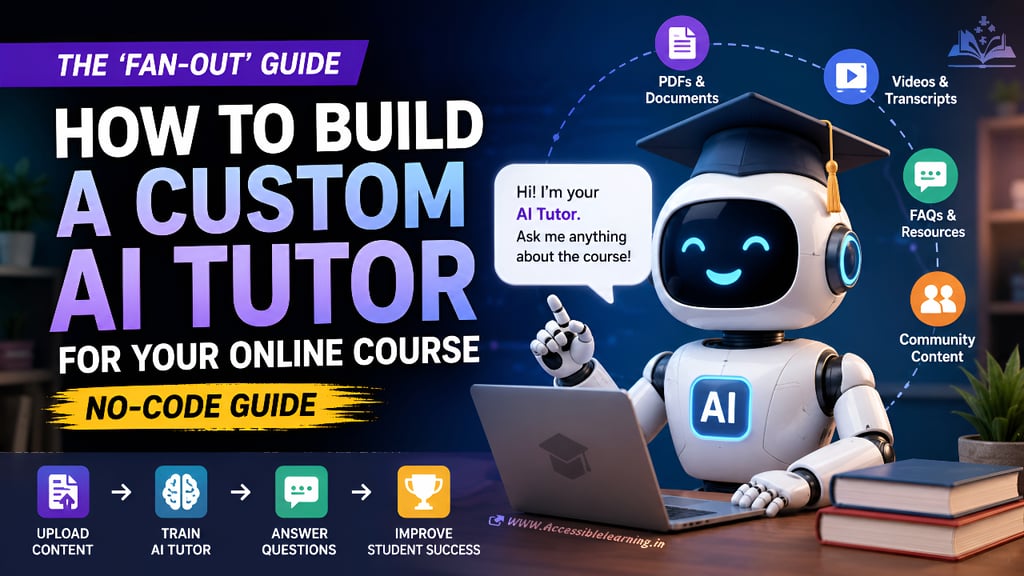
The online education market is becoming increasingly crowded. Creating a great course is no longer enough. Students expect instant answers, personalized support, and guidance that feels available whenever they need it.
Most course creators try to solve this by spending more time answering emails, responding in communities, and hosting additional support sessions. This works at first, but eventually support becomes the bottleneck that limits growth.
The solution is not hiring more people. It is building a custom AI tutor trained specifically on your course materials.
The good news is that you no longer need programming skills, machine learning expertise, or a development team to do it. Modern no-code AI platforms make it possible to create a highly capable course assistant in a matter of hours.
This guide breaks down the entire process step by step.
What Is a Custom AI Tutor?
A custom AI tutor is an AI assistant trained on your specific educational content. Instead of answering generic internet questions, it learns from:
Course videos
PDFs
Worksheets
Slide presentations
Knowledge bases
Community resources
Coaching frameworks
Standard operating procedures
Students can ask questions in natural language and receive answers based on your material rather than random internet sources.
For example:
Student Question:
"How do I create the funnel discussed in Module 3?"AI Tutor Response:
"According to Module 3, Step 1 is creating the lead magnet. Step 2 is setting up the landing page. Step 3 is connecting the email sequence..."
The tutor effectively becomes a 24/7 teaching assistant.
Why AI Tutors Are Becoming Essential
Course completion rates are notoriously low. Many students quit because they get stuck on small questions. A human instructor cannot realistically provide instant support to hundreds or thousands of learners. An AI tutor can.
Benefits include:
Faster student support
Better completion rates
Higher student satisfaction
Reduced support workload
Increased course scalability
More personalized learning experiences
The biggest advantage is leverage. You answer a question once through training materials, and the AI answers it thousands of times.

Step 1: Define the Tutor's Purpose
Before selecting tools, decide exactly what the AI tutor should do. Many creators make the mistake of trying to create an AI that does everything. Start narrow.
Possible roles include:
Course Support Assistant
Answers questions about lessons and assignments.
Learning Coach
Provides motivation and accountability.
Technical Troubleshooter
Helps students solve implementation issues.
Resource Navigator
Directs students to the right modules and materials.
Community Assistant
Answers frequently asked questions inside a membership group.
Write down the primary job of your tutor before moving forward.
Step 2: Gather Your Knowledge Base
The AI is only as good as the information you provide. Collect all educational resources into one organized repository. Include:
Course transcripts
PDF guides
Templates
Worksheets
Checklists
FAQs
Recorded coaching sessions
Community discussions
Documentation
Avoid uploading outdated materials. Conflicting information creates poor answers. The cleaner your knowledge base, the smarter your tutor becomes.
Step 3: Convert Videos Into Searchable Text
AI systems learn best from text. If your course contains videos, generate transcripts.
Sources include:
YouTube transcripts
Zoom recordings
Webinar recordings
Course platform exports
Review transcripts manually. Automatic transcription tools often introduce errors that reduce AI accuracy. A clean transcript dramatically improves answer quality.
Step 4: Organize Content Into Categories
Large collections of files become difficult for AI systems to search efficiently. Create logical categories such as the following:
Module-Based Structure
Module 1
Module 2
Module 3
Topic-Based Structure
Marketing
Sales
Operations
Content Creation
Skill-Based Structure
Beginner
Intermediate
Advanced
Well-structured content produces more relevant answers.
Step 5: Choose a No-Code AI Platform
Several platforms allow custom AI tutor creation without coding. Popular options include:
OpenAI GPTs
Good for quick deployment and simple setups.
Google Gems
Useful for users already working within Google's ecosystem.
Anthropic Projects
Excellent for handling large amounts of documentation.
Botpress
Strong customization and workflow capabilities.
Voiceflow
Popular for creating advanced conversational experiences.
Your choice matters less than the quality of your content.
Most platforms can deliver excellent results when properly trained.
Step 6: Upload Your Course Materials
Upload the documents collected earlier. Common file formats include:
PDF
DOCX
TXT
CSV
Markdown
Presentation files
Focus on quality over quantity. Ten highly relevant documents outperform one hundred loosely related files.
Step 7: Create System Instructions
This is where most AI tutors succeed or fail. The system prompt determines behavior. Example:
"You are an educational assistant for this course. Only answer using uploaded course materials. If information is unavailable, state that the material does not contain the answer. Do not invent information."
Strong instructions reduce hallucinations.
Weak instructions create unreliable tutors.

Step 8: Teach the Tutor How to Respond
Consistency matters. Define response rules such as:
Answer Style
Concise
Detailed
Beginner-friendly
Formatting Rules
Bullet points
Numbered steps
Module references
Learning Support
Ask clarifying questions
Recommend relevant lessons
Suggest next actions
The goal is making every interaction feel like it came from a trained instructor.
Step 9: Test Real Student Questions
Testing reveals weaknesses quickly. Gather actual questions students ask.
Examples:
How do I start?
Which lesson covers this?
What tool should I use?
Why is my setup not working?
What comes after Module 4?
Test at least 50 to 100 questions before launch. Document every inaccurate response. Improve the knowledge base continuously.
Step 10: Add Contextual Recommendations
The best AI tutors do more than answer questions. They guide learning. Example:
Student asks:
"How do I create an email sequence?"Tutor responds:
"Here's the process. You may also review Module 5 Lesson 2 and download the Email Sequence Template."
This creates a more complete educational experience.
Step 11: Build a Student-Friendly Interface
Students should not need technical knowledge to use the tutor. Keep interactions simple.
Provide:
Clear instructions
Example prompts
Suggested questions
Easy access points
The easier it is to use, the higher the adoption rate.
Step 12: Deploy the AI Tutor
Common deployment options include:
Course Platform
Embedded directly inside lessons.
Membership Community
Integrated into discussion groups.
Website Chat Widget
Available across the learning portal.
Mobile Experience
Accessible on smartphones and tablets.
Choose the location where students naturally seek help.
Step 13: Monitor Usage Data
Most creators stop after launch. That is a mistake.
Track:
Most common questions
Unanswered questions
Confusing topics
Completion rates
Student satisfaction
Every interaction becomes research. The tutor teaches you where the course needs improvement.
Step 14: Continuously Expand Knowledge
Your course evolves. Your AI tutor should evolve too. Update:
New lessons
New templates
New frameworks
New FAQs
New case studies
Treat the tutor as a living system. The most effective AI tutors improve every month.

Common Mistakes That Make AI Tutors Fail
Uploading Poor Content
Messy documents create messy answers.
Using Outdated Information
Students receive conflicting guidance.
Giving Weak Instructions
The AI begins guessing instead of teaching.
Never Testing Responses
Mistakes remain hidden until students encounter them.
Trying to Automate Everything
Human expertise should still exist for complex situations.
AI should handle repetitive support, not replace genuine instruction entirely.
Cost of Building a Custom AI Tutor
Most creators overestimate the expense.
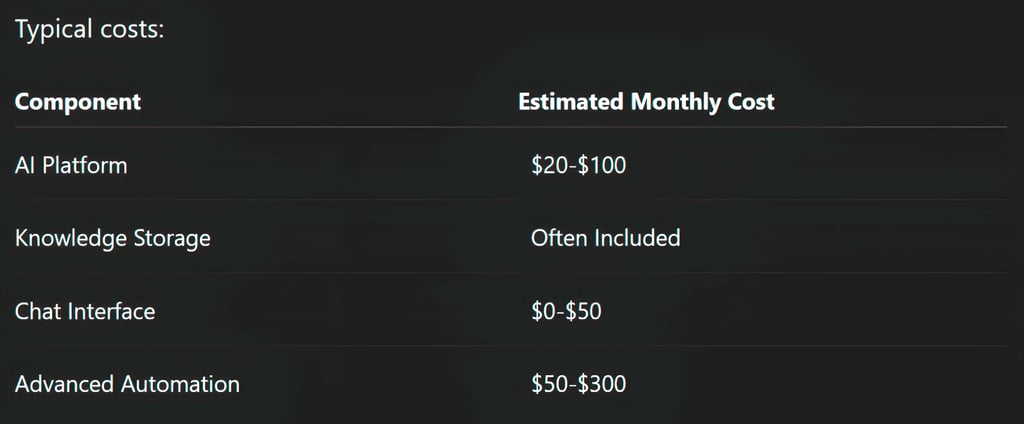
Many solo creators launch effective tutors for less than $100 per month.
The largest investment is organizing content, not software.
Future of AI-Powered Education
The next generation of online courses will not simply deliver information. They will provide personalized guidance at scale.
Students will increasingly expect the following:
Instant feedback
Personalized learning paths
Interactive explanations
Context-aware recommendations
24/7 support
Course creators who adopt AI tutors early gain a significant competitive advantage. Those who ignore the shift may find their courses feeling outdated compared to AI-enhanced learning experiences.
Building a custom AI tutor no longer requires coding skills, machine learning knowledge, or a large budget.
The real challenge is not technology. It is organizing expertise into a system that can reliably help students solve problems.
When done correctly, a custom AI tutor becomes more than a chatbot. It becomes a scalable teaching assistant that answers questions, guides learning, reduces support workload, and improves student outcomes around the clock.
The creators who win in the next phase of online education will not necessarily produce more content. They will build better systems for helping students succeed with the content they already have.
FAQ's
Q: Can I build an AI tutor without coding?
Yes. Modern no-code platforms allow you to upload documents, define instructions, and deploy an AI tutor without writing a single line of code.
Q: What files can I upload to train an AI tutor?
Most platforms support PDFs, DOCX files, presentations, transcripts, spreadsheets, FAQs, and text documents.
Q: How much does a custom AI tutor cost?
A basic setup typically costs between $20 and $100 per month, depending on the platform and usage volume.
Q: Can an AI tutor answer questions from my course videos?
Yes. Convert videos into transcripts and upload them as part of the tutor's knowledge base.
Q: Which AI platform is best for course creators?
The best platform depends on your needs, but GPTs, Gems, Claude Projects, Botpress, and Voiceflow are among the most popular options.
Q: Will an AI tutor replace human instructors?
No. It handles repetitive questions and basic support, while instructors focus on advanced guidance, coaching, and strategy.
Q: How accurate are custom AI tutors?
Accuracy depends on content quality, system instructions, testing, and regular updates to the knowledge base.
Q: Can I embed an AI tutor inside my online course platform?
Yes. Many AI tools can be embedded into course websites, membership portals, learning management systems, and community platforms.
Subscribe To Our Newsletter
All © Copyright reserved by Accessible-Learning Hub
| Terms & Conditions
Knowledge is power. Learn with Us. 📚

