

The 2026 AI Video Compressor Stack: 4K Compression Without Quality Loss
Discover how AI-powered Content-Adaptive Encoding (CAE) reduces 4K video file sizes by up to 60% without noticeable quality loss. Learn how modern AI video compressors work, compare Beamr vs Harmonic, and optimize client delivery workflows in 2026.
AI/FUTURECOMPANY/INDUSTRYDIGITAL MARKETINGARTIST/CREATIVITY
Kim Shin | Maximilian Schulz
6/19/20266 min read
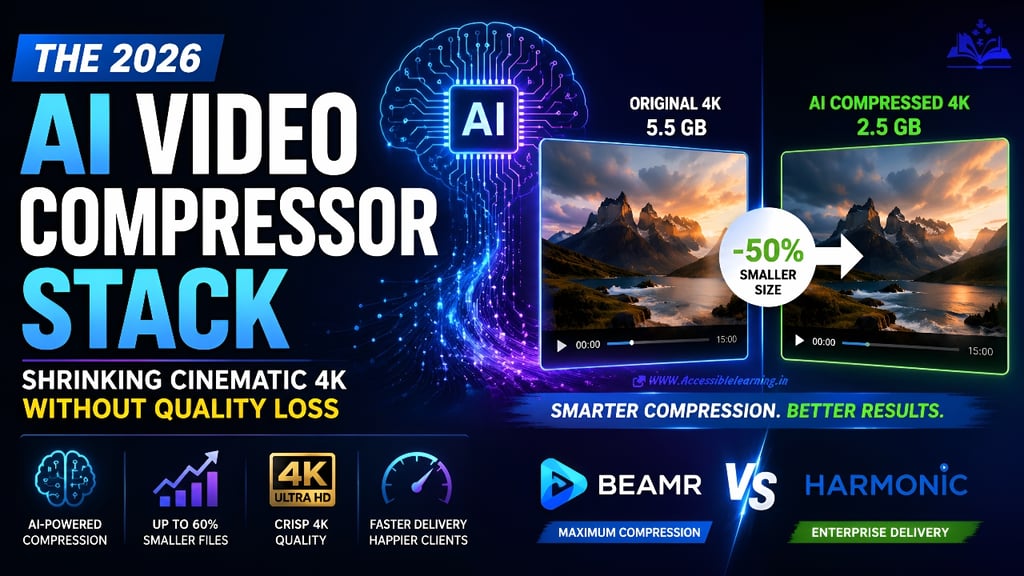
How to Cut Your 4K Video Export Sizes by 50% Without the Client Ever Seeing a Drop in Visual Quality
The biggest bottleneck in modern video production is no longer editing speed. It is delivery.
Cameras continue pushing higher resolutions, codecs are becoming increasingly sophisticated, and clients expect instant access to review files. Meanwhile, editors are exporting multi-gigabyte 4K projects that take hours to upload, download, review, and revise.
The old solution was simple: lower the bitrate.
The problem is that lowering bitrate often destroys image quality. Motion becomes muddy, gradients break apart, textures disappear, and clients notice immediately.
In 2026, a different approach is dominating professional workflows. Instead of reducing quality across an entire video, AI-powered Content-Adaptive Encoding (CAE) intelligently decides where quality matters and where it does not.
The result is often a 30% to 60% reduction in file size while maintaining visual quality that is nearly indistinguishable from the original master.
This is the modern AI video compressor stack and why every professional editor should understand it.
Why Traditional Video Compression Is Inefficient
Most video exports still rely on fixed bitrate or average bitrate encoding.
For example:
A 20 Mbps export applies roughly the same bitrate budget throughout the video.
Complex action sequences receive the same treatment as static interview shots.
Simple scenes often consume more data than necessary.
Difficult scenes may not receive enough data.
The encoder is essentially guessing.
A locked-off interview with a blurred background does not need the same bitrate as:
Fast-moving sports footage
Drone flyovers
Dense city scenes
Particle effects
Water simulations
High-motion cinematic action
Yet traditional compression treats them similarly. The result is wasted bandwidth.
What Is Content-Adaptive Encoding?
Content-Adaptive Encoding (CAE) is an intelligent compression methodology that analyzes video content before encoding.
Instead of assigning a uniform bitrate, the system evaluates:
Motion intensity
Scene complexity
Texture density
Edge detail
Camera movement
Noise levels
Object activity
Temporal changes between frames
The encoder then dynamically allocates bitrate where visual quality actually matters. In practice:
High-Complexity Scene
Aerial footage over a dense city. The encoder may increase bitrate significantly to preserve the following:
Building details
Vehicle movement
Fine textures
Window reflections
Low-Complexity Scene
A talking-head interview against a static background.
The encoder may aggressively reduce bitrate because little visual information changes between frames.
The viewer sees virtually identical quality.
The file becomes dramatically smaller.
This is the foundation of modern AI-powered video compression.
Why AI Changed Everything
Traditional adaptive encoding relied on mathematical heuristics.
AI systems introduced a more advanced approach.
Modern compression engines use machine learning models trained on the following:
Human visual perception
Motion analysis
Scene recognition
Artifact detection
Quality assessment metrics
The encoder learns what viewers actually notice.
Instead of preserving every pixel equally, AI prioritizes the following:
Faces
Eyes
Motion regions
Important foreground elements
Fine visual textures
Meanwhile, it compresses less important regions more aggressively. This produces better quality-to-size ratios than conventional encoders.

The Core Components of the 2026 AI Video Compressor Stack
Professional delivery workflows increasingly combine multiple technologies.
1. Per-Title Encoding
Every video receives its own encoding profile. Rather than using a preset:
Easy content gets lower bitrates.
Difficult content receives higher bitrates.
This prevents over-encoding simple projects.
2. Scene-Aware Analysis
AI identifies scene transitions and evaluates complexity independently. A documentary might contain:
Interviews
B-roll
Drone shots
Motion graphics
Each section receives different encoding parameters.
3. Perceptual Quality Optimization
Instead of maximizing technical metrics alone, modern systems optimize perceived quality. The goal is simple:
Maintain what viewers see while eliminating data they cannot perceive.
This is where many file-size reductions occur.
4. Content-Adaptive Bitrate Allocation
The encoder continuously adjusts bitrate based on visual demand. Benefits include:
Smaller files
Better visual consistency
Improved streaming performance
Faster uploads
5. AI Artifact Detection
Modern systems identify potential compression damage before delivery. Examples include:
Banding
Blocking
Mosquito noise
Texture smearing
Motion artifacts
The encoder automatically compensates where needed.
AI Video Compressor 2026: The Leading Platforms
Several vendors dominate the professional Content-Adaptive Encoding market.
Beamr
Beamr has become one of the most discussed names in AI-assisted compression. Its technology focuses on perceptual optimization.
Key advantages include the following:
Significant bitrate reduction
High visual fidelity
Automated quality targeting
Broad enterprise adoption
Beamr's approach analyzes visual significance and removes redundant data while preserving perceived image quality. For many workflows, reductions of 30% to 50% are achievable without visible degradation.
Harmonic
Harmonic remains a major player in professional encoding infrastructure.
The company emphasizes the following:
Broadcast delivery
OTT streaming
Large-scale video distribution
AI-assisted encoding optimization
Harmonic's adaptive encoding systems are particularly attractive for organizations handling massive video libraries and streaming workloads.
Beamr vs Harmonic: Which Is Better?
The answer depends on your workflow.
Choose Beamr If:
File-size reduction is the primary goal.
You need faster client delivery.
You regularly export review copies.
You want aggressive optimization without manual intervention.
Beamr often shines in post-production environments where bandwidth savings directly impact workflow efficiency.
Choose Harmonic If:
You manage large-scale streaming operations.
You operate OTT infrastructure.
Broadcast compliance matters.
Multi-platform distribution is required.
Harmonic excels in enterprise delivery ecosystems.
The Real Winner
For freelance editors and production teams delivering review files, the biggest benefit comes from adopting Content-Adaptive Encoding itself rather than obsessing over platform selection. The workflow change matters more than the software brand.
Real-World Example: 4K Client Review Workflow
Consider a 15-minute cinematic project.
Traditional Export:
Resolution: 4K
Codec: H.264
Bitrate: 50 Mbps
File size: Approximately 5.5 GB
AI Content-Adaptive Encoding:
Resolution: 4K
Visual quality maintained
Dynamic bitrate allocation
File size: Approximately 2.5–3 GB
The reduction can exceed 50%.
The client experiences:
Faster downloads
Faster cloud playback
Faster review cycles
Less storage consumption
Without noticing visual differences.
Why This Matters for Client Approvals
Most editors underestimate how much delivery speed affects project timelines.
Large exports create friction:
Slow uploads
Failed transfers
Review delays
Client frustration
Smaller files create momentum.
Clients review sooner.
Feedback arrives faster.
Projects close earlier.
The compression workflow becomes a business advantage rather than merely a technical optimization.

Best Practices for 4K Video Compression Without Quality Loss
The phrase "without quality loss" should always be approached carefully. Physics still exists. However, these practices deliver the closest results.
Start With a High-Quality Master
Garbage in produces garbage out.
Export a clean master before optimization.
Use Content-Adaptive Encoding
This remains the single largest quality-preserving improvement available today.
Avoid Multiple Compression Passes
Repeated encoding compounds quality loss.
Compress once whenever possible.
Test Difficult Scenes
Always inspect:
Fast motion
Skin tones
Gradients
Fine textures
Water
Foliage
These areas reveal compression issues first.
Prioritize Perceptual Quality
Viewers care about visual experience, not bitrate numbers.
The Future of AI Compression
The next generation of AI video compressors is moving beyond adaptive bitrate allocation. Emerging systems are beginning to:
Predict viewer attention
Compress based on eye-tracking models
Reconstruct details using generative AI
Enhance low-bitrate footage in real time
Optimize video for specific devices
The future is not merely smaller files. The future is smarter files.
Instead of preserving every pixel equally, AI will preserve only what humans actually perceive.
That shift is fundamentally changing video delivery economics.
The era of exporting massive 4K files and hoping clients have enough bandwidth is ending.
AI-powered Content-Adaptive Encoding has become one of the most impactful advances in post-production workflows. By analyzing footage frame-by-frame and allocating bitrate intelligently, modern compression systems achieve what traditional encoders rarely could: substantially smaller files without obvious visual compromise.
For editors, agencies, production houses, and content teams, the benefits are immediate.
Faster uploads
Faster downloads
Faster approvals
Lower storage costs
Improved client experience
Whether you're evaluating Beamr vs Harmonic or simply exploring the latest AI video compressor technologies in 2026, the key lesson remains the same:
Stop compressing every frame equally. Let AI decide where quality matters most, and your delivery pipeline becomes dramatically more efficient without sacrificing the cinematic look your clients expect.
FAQ's
Q: What is an AI video compressor in 2026?
An AI video compressor uses machine learning and perceptual analysis to reduce video file sizes while maintaining visual quality. Unlike traditional compression methods, AI-driven systems analyze scene complexity, motion, textures, and viewer perception to optimize bitrate allocation more efficiently.
Q: What is Content-Adaptive Encoding (CAE)?
Content-Adaptive Encoding (CAE) is an advanced compression technique that adjusts bitrate based on the content of each scene. Complex sequences receive more data, while static or low-motion scenes are compressed more aggressively. This approach improves compression efficiency without noticeable quality loss.
Q: Can I achieve 4K video compression without quality loss?
While no compression method is completely lossless at significant file-size reductions, modern AI-powered encoders can reduce 4K video sizes by 30% to 60% with little to no visible difference for most viewers. The goal is to preserve perceived quality rather than every pixel.
Q: How much can AI compression reduce 4K video file sizes?
Depending on the footage and encoder, AI compression can typically reduce file sizes by 30% to 60%. Videos with static backgrounds, interviews, and low-motion scenes often see the highest savings.
Q: Why is Content-Adaptive Encoding better than fixed-bitrate encoding?
Fixed bitrate encoding applies the same bitrate across an entire video, regardless of scene complexity. Content-Adaptive Encoding dynamically allocates bitrate where it is needed most, resulting in smaller files and more consistent visual quality.
Q: Beamr vs Harmonic: Which platform is better for video compression?
Beamr is often preferred for maximizing file-size reduction while maintaining perceptual quality, making it attractive for post-production and client delivery workflows. Harmonic is commonly used in enterprise, broadcast, and large-scale streaming environments where distribution infrastructure is a major priority.
Q: Does AI video compression speed up client review cycles?
Yes. Smaller video files upload faster, download faster, and stream more smoothly. This reduces delivery bottlenecks and allows clients to review and approve projects more quickly.
Q: What video formats benefit most from AI-powered compression?
High-resolution formats such as 4K UHD, 6K, and 8K video benefit the most because they contain significantly more data. AI compression can dramatically reduce file sizes while preserving detail and overall viewing quality.
Q: Is AI compression useful for YouTube and streaming platforms?
Absolutely. AI-powered encoding helps creators and streaming services reduce bandwidth costs, improve playback performance, and maintain high visual quality across different devices and internet speeds.
Q: What is the future of AI video compression?
Future AI compression technologies are expected to incorporate viewer-attention modeling, generative reconstruction, real-time enhancement, and device-specific optimization. These advancements will further reduce file sizes while improving perceived video quality.
Subscribe To Our Newsletter
All © Copyright reserved by Accessible-Learning Hub
| Terms & Conditions
Knowledge is power. Learn with Us. 📚

