

Supermaven IntelliJ vs Native Maven: Key Differences, Features, and Use Cases Explained
A detailed comparison of Supermaven IntelliJ vs Native Maven. Learn key differences, features, performance, use cases, and how AI-assisted development compares with traditional Java build tools.
AI ASSISTANTAI/FUTUREPROGRAMMING
Sachin K Chaurasiya
4/1/20265 min read
Java development has always been structured, but not always fast. Tools like Maven brought consistency, while newer AI-powered tools like Supermaven are bringing speed and intelligence.
If you are comparing Supermaven in IntelliJ with native Maven, you are not just comparing tools. You are comparing two different ways of working.
This guide goes deeper into architecture, workflows, performance, real-world use cases, and decision-making so you can choose with clarity.
Understanding the Roles Clearly
Before comparing, it is important to define what each tool actually does.
Native Maven (Build System)
Manages dependencies
Handles build lifecycle
Ensures reproducible builds
Integrates with CI/CD pipelines
Supermaven (AI Development Layer)
Assists coding in real time
Understands project context
Suggests improvements and fixes
Enhances developer productivity inside IntelliJ
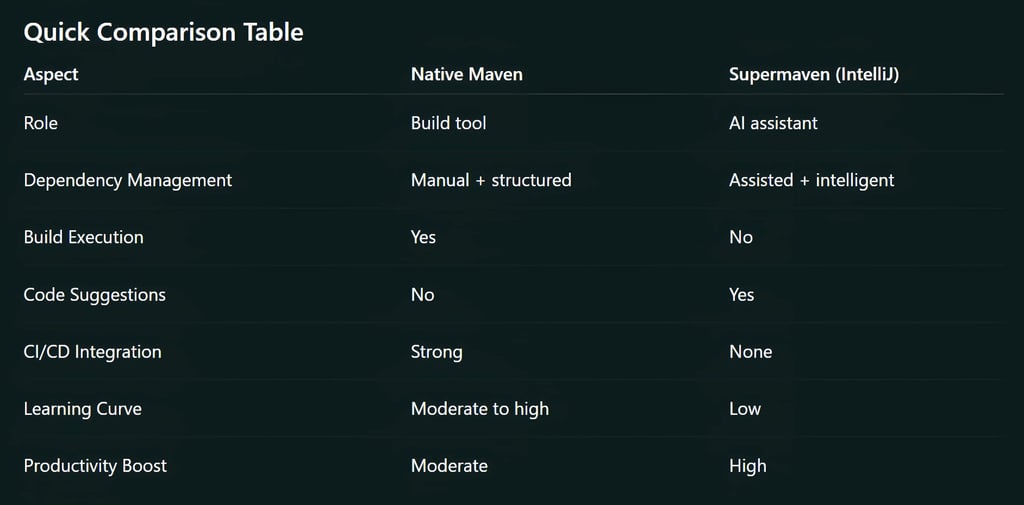
👉 Key clarity: These tools operate at different layers, not the same one.
Architecture Difference: Static vs Adaptive Systems
Native Maven Architecture
Declarative (defined in pom.xml)
Lifecycle-driven execution
Plugin-based extensions
Deterministic behavior
Maven does exactly what you configure, nothing more, nothing less.
Supermaven Architecture
Context-aware AI system
Learns from codebase patterns
Works in real-time inside IDE
Adapts suggestions dynamically
Supermaven evolves with your code; Maven does not.

Extended Feature Comparison
1. Dependency Resolution Intelligence
Native Maven
Uses central repositories
Strict version control
Manual conflict resolution
Supermaven
Suggests dependencies while typing
Helps detect missing imports instantly
Can guide version selection based on context
👉 Insight: Maven resolves dependencies. Supermaven helps you choose them smarter.
2. Code Generation & Boilerplate Reduction
Native Maven
No role in code generation
Relies on plugins or manual coding
Supermaven
Generates repetitive code patterns
Helps create classes, methods, configs quickly
Reduces time spent on scaffolding
👉 This is where AI makes a noticeable difference in speed.
3. Build Lifecycle Visibility
Native Maven
Phases: validate → compile → test → package → install → deploy
Logs are detailed but sometimes overwhelming
Supermaven
Helps interpret build errors
Explains what went wrong in plain language
Suggests fixes directly in IDE
👉 Less time reading logs, more time fixing problems.
4. Refactoring & Code Quality
Native Maven
No built-in refactoring intelligence
Depends on IDE tools
Supermaven
Suggests cleaner patterns
Improves readability and structure
Helps maintain consistency across files
5. Multi-Module Project Handling
Native Maven
Excellent support via parent-child POM structure
Clear module dependency hierarchy
Supermaven
Helps navigate across modules faster
Understands relationships between components
Suggests context-aware edits across modules
👉 Maven organizes. Supermaven helps you understand.
6. CI/CD and Automation
Native Maven
Deep integration with tools like Jenkins, GitHub Actions
Standard for automated pipelines
Supermaven
Not used in CI/CD pipelines
Focused on local development productivity
👉 Maven dominates here completely.
7. Error Handling & Troubleshooting
Native Maven
Stack traces and logs
Requires experience to interpret
Supermaven
Converts errors into understandable explanations
Suggests next steps
Reduces debugging time significantly
8. Performance Considerations
Native Maven
Build time depends on project size
Can be optimized with caching and parallel builds
Supermaven
Improves perceived speed, not build speed
Reduces time spent writing, searching, and debugging
👉 Real productivity gain comes from reduced mental load.
9. Offline and Reliability Factors
Native Maven
Can work offline (if dependencies cached)
Highly stable and predictable
Supermaven
Depends on AI processing (may require internet)
Performance tied to system and integration
👉 Maven wins in reliability-critical environments.
10. Security & Control
Native Maven
Full control over dependencies
Transparent configurations
Enterprise-friendly
Supermaven
AI suggestions may require validation
Developers must review generated code
👉 Human oversight is still essential with AI tools.
Workflow Comparison: Real Developer Scenario
Without Supermaven (Maven Only)
Search dependency online
Add to pom.xml
Run build
Fix errors from logs
Write boilerplate code manually
With Supermaven + Maven
Start typing functionality
Get inline suggestions
Auto-import dependencies
Fix issues in real time
Build with Maven
👉 Same process, but significantly faster and smoother.
Use Case Breakdown
When Native Maven Alone is Enough
Backend services with stable architecture
Enterprise environments with strict rules
CI/CD-heavy workflows
Teams focused on predictability over speed
When Supermaven Adds Maximum Value
Startups and rapid development teams
Developers working on unfamiliar codebases
Solo developers or small teams
Prototyping and MVP building
Ideal Setup (Recommended)
Use both together:
Maven for builds, dependency management, pipelines
Supermaven for coding speed, intelligence, and guidance
This combination gives you both stability and velocity.
Limitations You Should Know
Native Maven Limitations
Verbose XML configuration
Slow onboarding for beginners
Limited real-time feedback
Supermaven Limitations
Not a replacement for build tools
Suggestions are not always perfect
Requires developer judgment
May not fit highly restricted environments
Future Outlook: Where Things Are Heading
Development is moving toward:
AI-assisted coding environments
Reduced manual configuration
Faster iteration cycles
Smarter debugging systems
Maven will remain relevant as a backbone tool.
Supermaven represents the layer that sits on top, making development more intuitive.
If you are trying to choose between them, you are asking the wrong question.
Maven is essential
Supermaven is an accelerator
You do not replace Maven with Supermaven. You enhance Maven with Supermaven. That is where modern Java development is heading.
FAQ's
Q: What is the difference between Supermaven and Maven?
Supermaven is an AI-powered coding assistant inside IntelliJ that helps you write, refactor, and understand code faster. Maven is a build automation tool that manages dependencies and handles the build lifecycle. In simple terms, Maven builds your project, while Supermaven helps you write it.
Q: Can Supermaven replace Maven?
No, Supermaven cannot replace Maven. Maven is responsible for compiling code, managing dependencies, and running builds. Supermaven only enhances the development experience by providing intelligent suggestions and automation inside the IDE.
Q: Is Supermaven better than Maven?
They are not direct competitors, so one is not better than the other. Maven is essential for build processes and project structure. Supermaven improves productivity by reducing manual effort and speeding up coding tasks.
Q: Should I use Supermaven with Maven in IntelliJ?
Yes, using both together is the most effective approach. Maven ensures reliable builds and dependency management, while Supermaven helps you code faster, debug quicker, and reduce repetitive work.
Q: Does Supermaven improve Java development speed?
Yes, Supermaven can significantly improve development speed. It reduces time spent on boilerplate code, suggests solutions in real time, and helps resolve errors faster, which leads to quicker development cycles.
Q: Is Maven still relevant in modern Java development?
Yes, Maven is still highly relevant and widely used. It remains a standard tool for dependency management and build automation, especially in enterprise environments and CI/CD pipelines.
Q: Does Supermaven work without Maven?
Yes, Supermaven can work without Maven because it is not tied to any specific build tool. However, for Java projects, you still need a build system like Maven or Gradle to manage dependencies and builds.
Q: What are the advantages of Supermaven in IntelliJ?
Real-time code suggestions
Faster code generation
Better understanding of large codebases
Reduced debugging time
Improved developer productivity
Q: What are the limitations of Maven compared to modern tools?
Requires manual configuration in XML
Limited real-time feedback
Slower debugging process
No built-in intelligence or suggestions
Q: Is Supermaven suitable for enterprise projects?
It can be useful, but it depends on the organization.
Enterprises that prioritize strict control and predictable workflows may rely more on Maven alone. Teams that allow AI-assisted development can benefit from increased productivity with Supermaven.
Q: How does Supermaven help with debugging Maven errors?
Supermaven can interpret error messages, explain them in simple terms, and suggest fixes directly in your IDE.
This reduces the need to manually analyze long Maven logs.
Q: Which is better for beginners: Supermaven or Maven?
Supermaven is more beginner-friendly because it provides guidance and suggestions.
Maven has a steeper learning curve due to its configuration-based approach.
Q: Do I need internet access to use Supermaven?
In most cases, yes. Since Supermaven relies on AI processing, it may require an internet connection for full functionality, unlike Maven, which can work offline if dependencies are cached.
Q: Can Supermaven help with dependency management?
Yes, but indirectly. Supermaven can suggest dependencies and auto-import libraries, but Maven is still responsible for actually managing and resolving them.
Q: What is the best setup for modern Java development?
The best setup is a combination of both:
Maven for builds, dependencies, and pipelines
Supermaven for faster coding, debugging, and development assistance
This setup balances stability with productivity.
Subscribe to Frontier Intelligence
All © Copyright reserved by Accessible-Learning Hub
| Terms & Conditions
Accessible Learning Hub — Actionable clarity for high-agency minds.
Weekly breakdowns on AI breakthroughs, capital flow, and human performance systems. Zero fluff.