

Runway vs Pika Labs (2026): Which AI Video Generator Is Best for Creators?
A detailed comparison of Runway vs Pika Labs covering features, video quality, speed, control, and real-world use cases. Learn which AI video generator is best for creators, marketers, and filmmakers in 2026, along with expert tips to improve your workflow and results.
Sachin K Chaurasiya
4/22/20264 min read
AI video generation is no longer experimental. It’s now a serious part of modern content creation. Tools like Runway and Pika Labs are leading this shift, helping creators turn ideas into videos in minutes.
At a glance, both tools may seem similar. But once you start using them, the differences become clear. They are built for very different workflows. This guide breaks everything down in a simple, practical way so you can choose what actually fits your work.
What is Runway?
Runway is a full AI-powered creative suite designed for professional video production. It combines generation, editing, and post-processing in one platform.
Key Capabilities
Text-to-video, image-to-video, and video-to-video generation
Advanced models (Gen-3, Gen-4) for higher realism
Motion Brush to control movement in specific areas
Camera controls like pan, zoom, and tracking
AI editing tools such as inpainting, background removal, and upscaling
API access for automation and integration
Core Strength
Runway focuses on precision and cinematic output. It’s not just about generating clips but about producing something close to final-quality footage.
What is Pika Labs?
Pika Labs is designed for speed, creativity, and accessibility. It removes complexity and lets users generate videos quickly.
Key Capabilities
Text-to-video and image-to-video generation
Fast rendering cycles for quick iterations
Built-in creative tools:
Effects (stylization and transformations)
Object replacement
Scene extension
Optimized for short-form content (Reels, Shorts, TikTok)
Simple UI for beginners
Core Strength
Pika focuses on rapid experimentation and ease of use, making it ideal for creators who want quick results without a technical learning curve.
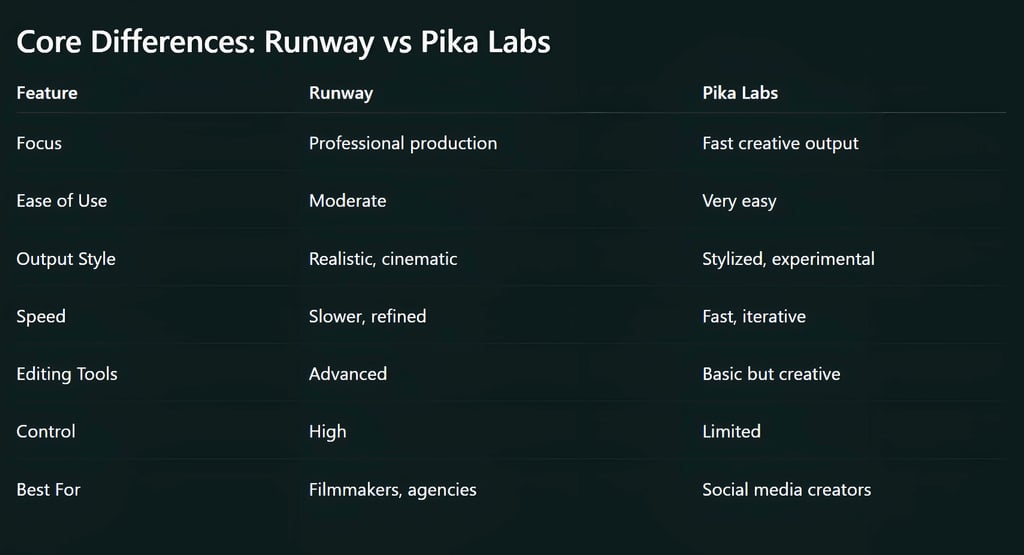
Video Quality & Rendering Behavior
Runway
Better temporal consistency (frames match smoothly)
More stable lighting and motion physics
Stronger scene coherence across longer clips
Pika Labs
Strong at stylized animation
Handles quick variations better
More flexible with creative transformations
Technical Insight:
Runway prioritizes coherence and realism, which often requires more compute time per generation.
Pika prioritizes latency and iteration speed, meaning results come faster but may vary in consistency.
Speed vs Control
This is the biggest trade-off.
Runway
Offers structured control (camera, motion, composition)
Better for planned storytelling
Slower generation due to higher fidelity
Pika Labs
Generates faster outputs
Ideal for testing multiple prompts quickly
Less control over fine details
Tip: If your workflow involves scripting, storyboarding, or client delivery, control matters more than speed.
Advanced Technical Breakdown
1. Motion Handling
Runway: Uses guided motion tools (like Motion Brush) to control specific regions
Pika: Relies more on prompt interpretation and presets
2. Prompt Sensitivity
Runway: Responds well to structured prompts (camera angles, lighting, lens type)
Pika: Responds better to creative or abstract prompts
Example:
Runway prompt:
“Wide cinematic shot, 35mm lens, soft lighting, slow dolly-in."Pika prompt:
“Dreamy glowing city with neon rain, animated style."
3. Frame Consistency
Runway: More stable across frames (better for storytelling)
Pika: May vary between frames but works well for short clips
4. Resolution & Output
Runway generally produces higher-quality outputs suitable for editing pipelines
Pika outputs are optimized for social platforms
Workflow Comparison
Runway Workflow
Idea → Prompt → Generate → Edit → Refine → Export
Pika Workflow
Idea → Prompt → Generate → Iterate → Post
Runway is a production pipeline
Pika is an idea generator
Use Cases
Choose Runway if you:
Create YouTube videos, ads, or films
Need realistic visuals
Want control over motion and composition
Work on client projects
Choose Pika Labs if you:
Create short-form content
Need fast turnaround
Experiment with multiple ideas daily
Prefer simplicity over control
Pricing & Accessibility
Runway
Credit-based usage
Paid plans for advanced models
Designed for scaling production
Pika Labs
Free tier available
Paid upgrades for faster rendering
More beginner-friendly entry

Pro Tips (Practical + Technical)
Use Hybrid Workflow
Start with Pika for ideation
Move to Runway for final output
This saves both time and compute cost.
Structure Your Prompts (Runway)
Include:
Camera angle
Lighting
Subject movement
Scene type
This improves output quality significantly.
Iterate Fast (Pika)
Generate multiple versions quickly
Pick the best concept
Refine externally if needed
Control Motion Carefully
In Runway:
Use Motion Brush sparingly
Over-controlling can make motion unnatural
Keep Clips Short
Both tools perform better with:
3–8 second clips
Simple scenes
Longer clips increase inconsistency.
Combine With Editing Tools
Export outputs and refine using:
Traditional editors (Premiere Pro, CapCut)
AI upscalers for better quality
Pros and Cons
Runway
Pros
High-quality cinematic output
Advanced control
Production-ready
Cons
Learning curve
Slower iteration
Pika Labs
Pros
Fast and easy
Great for experimentation
Beginner-friendly
Cons
Less control
Lower realism in some cases
There is no single winner here.
Runway is built for quality and control
Pika Labs is built for speed and creativity
Most smart creators don’t choose one. They combine both.
Think of it like this:
Runway = Final production tool
Pika Labs = Creative playground
If you understand that difference, you’ll not only choose better but also create better content.

FAQ's
Q: What is the main difference between Runway and Pika Labs?
The main difference is their focus. Runway is built for professional video production with advanced controls and realistic output, while Pika Labs is designed for fast, creative, and easy video generation, especially for short-form content.
Q: Which AI video generator is better for beginners?
Pika Labs is generally better for beginners because it has a simple interface and faster results. Runway has more features but comes with a learning curve.
Q: Is Runway better than Pika Labs for professional work?
Yes, Runway is better suited for professional use. It offers more control over motion, camera, and editing, making it ideal for filmmakers, agencies, and high-quality content production.
Q: Can I use Pika Labs for social media content?
Yes, Pika Labs is highly optimized for platforms like Instagram Reels, YouTube Shorts, and TikTok. Its fast generation and creative effects make it perfect for viral content.
Q: Which tool provides better video quality?
Runway generally provides more realistic and consistent video quality, especially for longer or structured scenes. Pika Labs focuses more on stylized and creative outputs rather than cinematic realism.
Q: Are Runway and Pika Labs free to use?
Both platforms offer limited free access. However, advanced features, higher-quality outputs, and faster rendering typically require paid plans.
Q: Can I use both Runway and Pika Labs together?
Yes, many creators use both tools in a hybrid workflow. Pika Labs is often used for idea generation and quick drafts, while Runway is used for refining and producing final-quality videos.
Q: Which AI video tool is faster?
Pika Labs is faster when it comes to generating videos and testing multiple ideas quickly. Runway is slower but delivers more refined and controlled results.
Q: Do these tools support commercial use?
Yes, both Runway and Pika Labs allow commercial usage, but it depends on the subscription plan and licensing terms. Always review their latest policies before using outputs for client or business work.
Q: What type of creators should use Runway vs Pika Labs?
Runway is best for filmmakers, agencies, and advanced creators
Pika Labs is ideal for social media creators, marketers, and beginners
Subscribe to Frontier Intelligence
All © Copyright reserved by Accessible-Learning Hub
| Terms & Conditions
Accessible Learning Hub — Actionable clarity for high-agency minds.
Weekly breakdowns on AI breakthroughs, capital flow, and human performance systems. Zero fluff.