

Ollama vs. LM Studio: The Best Way to Run AI Locally in 2026
Compare Ollama vs. LM Studio in 2026 and discover the best way to run AI locally. Learn the differences in ease of use, performance, and developer features, and which tool is better for beginners or advanced AI workflows.
AI/FUTURECOMPANY/INDUSTRYEDITOR/TOOLS
Sachin K Chaurasiya
3/20/20268 min read


Running AI locally has become one of the biggest shifts in the AI ecosystem. Instead of sending data to cloud APIs, many developers, creators, and privacy-focused users now run large language models directly on their own computers. Local AI offers clear advantages: stronger privacy, no API costs, offline access, and full control over models and data.
Two tools dominate this space in 2026: Ollama and LM Studio. Both allow users to run powerful open-weight models such as LLaMA, Mistral, Qwen, and others on personal hardware. At first glance they may look similar, but their design goals are very different.
The real comparison comes down to one key idea:
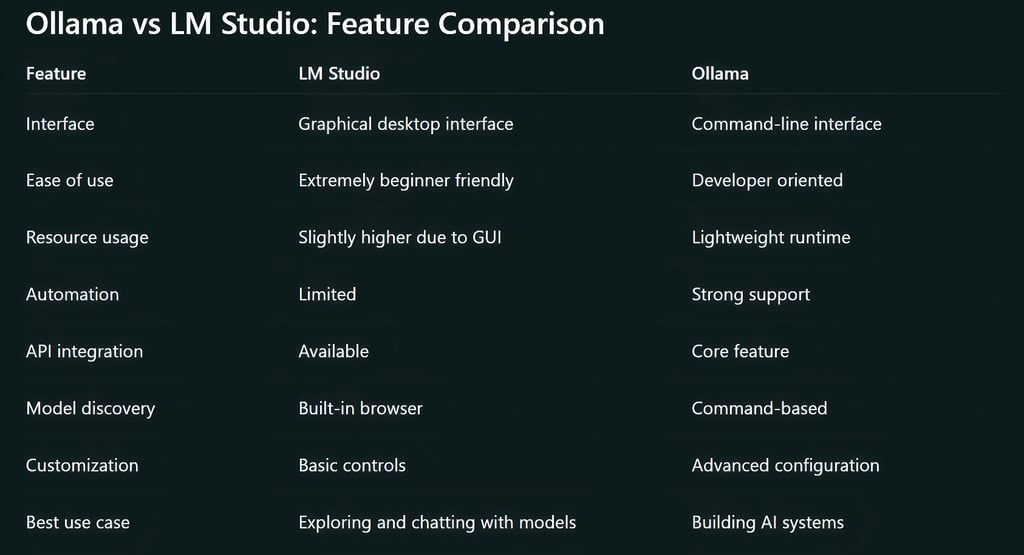
LM Studio prioritizes simplicity and visual usability.
Ollama prioritizes flexibility and developer-level power.
Understanding how these tools differ helps determine which one is the best way to run AI locally for your workflow.
Why Local AI Is Growing So Fast
A few years ago, running large AI models required expensive cloud infrastructure or specialized hardware. Today, improved model optimization and inference engines allow many models to run efficiently on consumer laptops and desktops.
This change has created a new wave of tools that simplify the process of running AI locally. Instead of complex installations and manual configurations, users can install a program, download a model, and begin interacting with AI within minutes.
Ollama and LM Studio represent two different philosophies for solving this problem.
One is built for developers building systems.
The other is built for users exploring AI easily.
What Is Ollama?
Ollama is a lightweight runtime that lets users run AI models locally through a command-line interface and a local API. Instead of functioning as a typical chat application, Ollama behaves more like a local AI engine running on your machine.
It is designed primarily for developers who want to integrate AI models into applications, automation workflows, or private AI tools.
Core Features of Ollama
Command-Line Driven Workflow
Ollama operates primarily through the terminal. Users download models and run them with simple commands. Once a model is installed, it can be started instantly from the command line.
This approach keeps the tool lightweight and efficient while giving developers full control.
Built-in Local API
One of Ollama’s most important features is its local API. Applications can communicate with a locally running model just like they would with an online AI service.
This allows developers to build tools such as:
AI coding assistants
document analysis systems
chatbots
personal AI knowledge bases
AI agents
Custom Model Configuration
Ollama allows users to create custom configurations for models. These configurations can define system prompts, parameters, and behavior rules.
This makes it easier to tailor models for specific tasks or workflows.
Model Versioning and Reproducibility
Developers can manage different model versions and configurations. This helps maintain consistent AI environments across multiple machines or development setups.
Lightweight Runtime
Because Ollama runs without a heavy graphical interface, it consumes fewer system resources compared to many GUI-based tools.

What Is LM Studio?
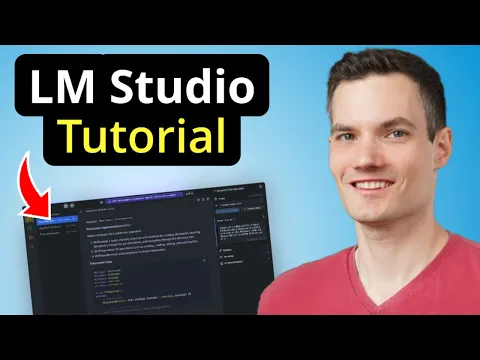
LM Studio takes a different approach. It is a full desktop application designed to make running AI models locally easy for everyone, including non-technical users.
Instead of relying on command-line tools, LM Studio provides a graphical interface where users can browse, download, and interact with models visually.
The goal is simple: remove technical barriers to local AI experimentation.
Core Features of LM Studio
Intuitive Desktop Interface
LM Studio provides a clean graphical interface that allows users to manage models and chat with them directly. The experience is similar to using a standard desktop app.
Built-in Model Marketplace
Users can browse available models directly inside the application. Models can be downloaded with a single click and launched immediately.
This simplifies the process of discovering new models.
Integrated Chat Environment
LM Studio includes a built-in chat interface where users can interact with AI models in real time. This makes it ideal for prompt experimentation and general AI usage.
Visual Hardware Controls
Users can adjust hardware settings such as GPU usage, memory allocation, and inference parameters through simple sliders or menus.
This removes the need for manual configuration files.
Easy Model Switching
Users can quickly switch between different models to compare responses, performance, and behavior.
Ease of Use: The Biggest Differentiator
When comparing Ollama and LM Studio, the biggest difference is how approachable each tool feels to new users.
LM Studio for Non-Technical Users
LM Studio is one of the easiest ways to start using local AI. The entire process is visual and straightforward.
Typical workflow:
Install LM Studio
Browse available models
Click download
Start chatting with the model
No terminal commands or programming knowledge are required. Because of this simplicity, LM Studio is often recommended for beginners who want to explore local AI.
Ollama for Developers and Advanced Users
Ollama assumes some familiarity with developer tools. Users typically install it through a command line and run models with commands. For developers, this workflow feels fast and efficient. For beginners, it can require a short learning curve. Once users understand the basic commands, however, Ollama becomes extremely powerful.
Performance and System Efficiency
Both tools rely on similar underlying model inference technologies, so their core performance is often comparable. However, there are still some differences.
Ollama Efficiency
Ollama is generally more lightweight because it does not run a full graphical interface. This leads to:
lower memory overhead
faster startup for models
better handling of automated requests
These advantages are most noticeable in developer workflows.
LM Studio Performance
LM Studio uses more memory because it runs a graphical desktop interface alongside the model.
For most personal use cases, this difference is minor and does not significantly impact performance.
Model Ecosystem and Compatibility
Both Ollama and LM Studio support a wide range of open-weight AI models. Common supported models include:
LLaMA family models
Mistral models
Qwen models
Code generation models
instruction-tuned chat models
However, the way users interact with these models differs.
Ollama Model Management
Ollama treats models more like packages that can be installed and managed through commands. Users can also build custom model configurations with specific prompts or parameters.
LM Studio Model Discovery
LM Studio focuses on exploration. The built-in model browser makes it easy to find and download models without searching external repositories.
Workflow and Productivity Differences
The best tool often depends on how someone plans to use local AI.
LM Studio Workflow
LM Studio works best for:
testing prompts
experimenting with different models
learning how local AI works
private AI chat assistants
AI research exploration
The visual interface encourages experimentation.
Ollama Workflow
Ollama shines when AI becomes part of a larger system. Examples include:
AI-powered applications
automated workflows
coding assistants
AI agents
local AI APIs
Developers can easily integrate Ollama into software projects.
Privacy and Security Advantages
Both Ollama and LM Studio offer strong privacy advantages compared to cloud AI services.
When running models locally:
data stays on your device
prompts are not sent to external servers
sensitive information remains private
internet access is not required
For many organizations and researchers, this privacy benefit is one of the main reasons to run AI locally.
Offline AI Capabilities
Local AI tools allow models to run without internet connectivity once they are installed.
This is useful for:
secure environments
travel situations without reliable internet
private research environments
organizations with strict data policies
Both Ollama and LM Studio fully support offline operation after models are downloaded.
Hardware Requirements for Local AI
Running AI locally depends heavily on hardware. Recommended system specifications typically include:
16 GB or more system RAM
a modern CPU
a GPU with sufficient VRAM for larger models
fast SSD storage
Smaller models with around 7B parameters can run on many modern laptops. Larger models require more powerful GPUs and memory. The model itself usually determines performance more than the software used to run it.
When LM Studio Is the Better Choice
LM Studio is ideal when ease of use is the top priority.
It works best for:
beginners exploring local AI
prompt experimentation
comparing different models
running a private AI chat assistant
users who prefer graphical interfaces
For many people, LM Studio feels like installing a local version of ChatGPT.
When Ollama Is the Better Choice
Ollama becomes the better option when deeper control and automation are required. It is particularly useful for:
developers building AI tools
integrating AI into applications
automation workflows
running AI models as services
advanced experimentation with model configurations
For technical users, Ollama often becomes the foundation of local AI development.
The Practical Reality: Many Users Use Both
The debate between Ollama and LM Studio often assumes that users must choose one tool. In practice, many people use both.
LM Studio is excellent for discovering and testing models in a visual environment.
Ollama is powerful for running those models inside applications and automation systems.
Because of this, advanced users often experiment with models in LM Studio first and then deploy them through Ollama when building real tools.
Local AI has become one of the most exciting developments in modern computing. The ability to run powerful AI models directly on personal hardware changes how developers, researchers, and creators interact with artificial intelligence.
Both Ollama and LM Studio make this possible, but they serve different audiences. LM Studio focuses on accessibility and ease of use, making it one of the best entry points for people exploring local AI for the first time. Ollama focuses on flexibility and developer power, making it a strong choice for building real AI systems.
The best choice ultimately depends on your workflow. For beginners and experimentation, LM Studio offers a smooth starting point. For developers and advanced users building AI-driven tools, Ollama provides the control and integration capabilities needed to push local AI further.
FAQ's
Q: What is the main difference between Ollama and LM Studio?
The main difference lies in their design focus. LM Studio is built for simplicity and visual usability, making it ideal for beginners who want to run AI models locally without technical setup. Ollama is designed for developers, offering command-line control and a local API that makes it easier to integrate AI into applications, scripts, and automation workflows.
In simple terms, LM Studio feels like a desktop app for AI, while Ollama behaves more like a local AI engine.
Q: Which is easier to use for beginners: Ollama or LM Studio?
LM Studio is generally easier for beginners. It provides a graphical interface where users can download models, run them, and chat with AI without using terminal commands.
Ollama requires basic command-line usage, which may feel unfamiliar to non-technical users. However, once someone understands the basic commands, it becomes very efficient to work with.
Q: Can Ollama and LM Studio run the same AI models?
Yes, both tools support many of the same open-weight models. Popular models such as LLaMA, Mistral, and Qwen can typically run on both platforms.
However, the way models are installed and managed differs. LM Studio focuses on visual browsing and downloads, while Ollama uses command-based model management.
Q: Do you need a GPU to run Ollama or LM Studio?
A GPU is not always required, but it significantly improves performance. Smaller models can run on CPUs, although responses may be slower.
For smoother performance, a GPU with sufficient VRAM is recommended. Many users run models with around 7–8 billion parameters on consumer GPUs or high-RAM laptops.
Q: Is local AI safer than cloud AI services?
Running AI locally can improve privacy because prompts and data stay on your device. Nothing needs to be sent to external servers once the model is downloaded.
This makes local AI useful for sensitive tasks such as private research, internal business data analysis, or offline work environments.
Q: Can Ollama run AI models offline?
Yes. Once a model is downloaded, Ollama can run completely offline. Internet access is only required for downloading models or updates.
This allows users to run AI systems even in environments with restricted or unreliable internet connectivity.
Q: Does LM Studio support offline AI usage?
Yes, LM Studio also supports offline operation. After downloading a model, it can run locally without an internet connection. This makes it useful for privacy-focused users and secure environments.
Q: Which tool is better for building AI applications?
Ollama is generally the better option for building AI-powered applications. Its local API allows developers to connect software, scripts, and services directly to locally running models.
This makes it suitable for chatbots, automation tools, coding assistants, and AI agents.
Q: Is LM Studio only for beginners?
Not at all. While LM Studio is beginner-friendly, many experienced users still use it for quick experimentation. It is a convenient environment for testing prompts, comparing models, and exploring new AI capabilities before deploying them elsewhere.
Q: Can you use Ollama and LM Studio together?
Yes, and many users do. LM Studio works well for discovering and testing models in a visual environment. Once the best model is found, developers often run it through Ollama to integrate it into applications or automated workflows.
Using both tools together can provide a flexible and efficient local AI workflow.
Q: Which tool is better for running AI locally in 2026?
There is no single answer because the best choice depends on how you plan to use AI.
LM Studio is better for beginners, experimentation, and visual interaction with models. Ollama is better for developers who want to build systems, automate workflows, or integrate AI into software.
For many users, the ideal setup involves experimenting with LM Studio and deploying with Ollama.
Subscribe to Frontier Intelligence
All © Copyright reserved by Accessible-Learning Hub
| Terms & Conditions
Accessible Learning Hub — Actionable clarity for high-agency minds.
Weekly breakdowns on AI breakthroughs, capital flow, and human performance systems. Zero fluff.