

Lindy vs. Zapier vs. Make: The Future of AI Automation Workflows
Discover the key distinctions between Lindy, Zapier and Make in 2026 Discover how AI agents are revolutionizing business automation, CRM management, sales workflows, and operational efficiency beyond the scope of traditional rule-based systems.
COMPANY/INDUSTRYAI/FUTUREENTREPRENEUR/BUSINESSMANDIGITAL MARKETING
Sachin K Chaurasiya
6/26/20267 min read
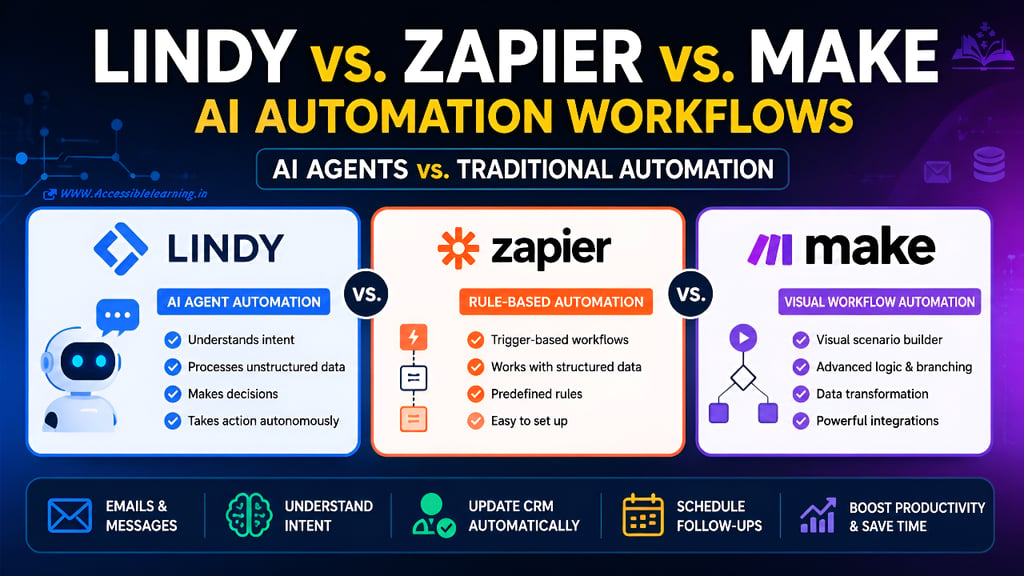
Automation has become a core business requirement rather than a luxury. From lead management and customer support to internal operations and sales outreach, companies are constantly looking for ways to reduce manual work and improve efficiency.
For years, platforms like Zapier and Make dominated the automation landscape by connecting applications through predefined workflows. These tools transformed how businesses moved data between systems without requiring custom code.
However, a new generation of AI-powered automation platforms is changing the conversation.
Instead of simply connecting apps through rigid if-this-then-that rules, AI agent platforms such as Lindy can understand context, interpret messy information, make decisions, and complete tasks autonomously.
This shift represents one of the biggest changes in business automation since the rise of no-code tools.
The question is no longer:
"Which workflow builder should I use?"
It's increasingly becoming the following:
"Do I need automation, or do I need an AI employee?"
This article explores the differences between Lindy, Zapier, and Make, helping operations managers, sales teams, and business owners choose the right platform for their workflow needs.
The Evolution of Business Automation
Business automation has gone through three major phases.
Phase 1: Manual Processes
Employees manually copied information between systems. Examples include:
Copying leads from emails into CRMs
Updating spreadsheets by hand
Creating support tickets manually
Sending repetitive follow-up emails
These tasks consumed hours of productive work every week.
Phase 2: Rule-Based Automation
Platforms like Zapier and Make automated repetitive workflows.
Example:
Trigger: New form submission
Action:
Create CRM contact
Send Slack notification
Add lead to email campaign
Everything worked well as long as the data followed predictable patterns.
Phase 3: AI Agent Automation
AI agents introduce a completely different approach. Instead of following rigid instructions, they can:
Read emails
Understand intent
Extract information
Make decisions
Complete multi-step tasks
This is where Lindy enters the picture. Rather than automating actions, it automates thinking.

What Is Zapier?
Zapier is one of the most widely used no-code automation platforms. It connects thousands of applications through workflows called "Zaps."
A Zap follows a simple structure:
Trigger → Action
Example:
New Shopify order
Create invoice in QuickBooks
Send customer email
Notify team in Slack
Zapier excels when:
Processes are predictable
Data is structured
Rules rarely change
Its simplicity is one of its greatest strengths.
What Is Make?
Make takes automation further by providing a visual workflow builder. Instead of simple trigger-action chains, Make allows the following:
Branching logic
Data transformation
Iterators
Complex conditional paths
Advanced API integrations
For technical teams, Make often provides greater flexibility than Zapier. Many businesses use Make when workflows become too complicated for traditional Zapier automations.
What Is Lindy?
Lindy represents a newer category of automation software. Rather than relying solely on predefined workflows, Lindy uses AI agents that can:
Understand natural language
Interpret unstructured information
Analyze context
Take actions autonomously
Communicate with applications
Think of Zapier and Make as workflow engines. Think of Lindy as a digital employee. The difference becomes obvious when dealing with real-world business communication.
The Core Difference: Rules vs Intelligence
Most automation discussions focus on integrations.
That misses the real distinction.
The actual difference is how each platform handles uncertainty.
Zapier and Make Require Explicit Instructions
Imagine receiving this email:
Hey Sarah,
We loved the demo last week.
We're probably looking at around 25 seats initially.
Can someone reach out next Tuesday to discuss pricing?Thanks.
A human instantly understands:
Company is interested
Potential customer
25-seat opportunity
Follow-up needed
Schedule outreach next week
For Zapier or Make, this email is problematic.
The workflow must be carefully designed to:
Detect specific patterns
Extract seat count
Identify intent
Determine lead status
Schedule follow-up
Without explicit rules, the automation often fails.
Lindy Understands Intent
An AI agent can process the same email and conclude the following:
This is a qualified lead
Opportunity size is 25 seats
Pricing discussion requested
Follow-up should happen next Tuesday
The system can then:
Update CRM records
Create tasks
Schedule meetings
Notify sales representatives
Draft personalized responses
No massive collection of predefined rules is required. This ability to interpret meaning is what separates AI agent automation from traditional workflow automation.
Structured Data vs Unstructured Data
This is where the gap becomes most visible.
Structured Data
Examples:
Form submissions
Spreadsheet rows
CRM fields
Database entries
Traditional automation handles these perfectly.
Example:
Name = John Smith
Email = john@example.com
Company = ABC Inc.
Zapier and Make thrive in this environment.
Unstructured Data
Examples:
Emails
Meeting transcripts
Voice notes
Support conversations
Customer messages
These sources contain ambiguity. Humans understand them naturally. Traditional automation struggles. AI agents excel. Lindy was designed specifically for these scenarios.
CRM Management Example
Let's compare all three platforms.
Using Zapier
Workflow:
New email arrives
Filter based on keywords
Extract fields
Update CRM
Problem:
Every variation requires additional rules.
A slightly different email format may break the workflow.
Using Make
Workflow:
Parse email
Run conditions
Route data
Update CRM
More powerful than Zapier. But complexity grows rapidly as exceptions increase. Large scenarios can become difficult to maintain.
Using Lindy
Workflow:
Read email
Understand context
Identify opportunity
Update CRM
Create follow-up task
Notify salesperson
The AI handles interpretation automatically. Instead of defining every possible scenario, businesses define objectives.

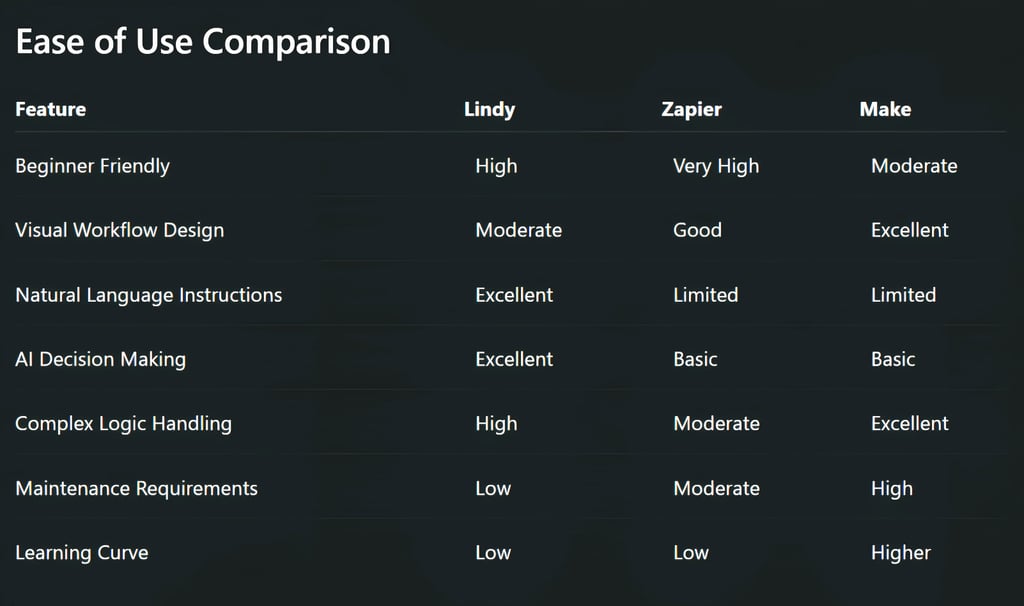
Integration Ecosystem
Integrations remain important.
Zapier
One of the largest integration libraries available.
Thousands of supported applications.
Best choice when app compatibility is the primary concern.
Make
Strong integration ecosystem.
Particularly popular among power users and technical operators.
Offers greater flexibility for custom workflows.
Lindy
Growing integration network.
Focuses more on AI-powered execution rather than sheer connector volume.
For many businesses, the quality of decisions matters more than the number of integrations.
Cost Considerations
Many businesses focus only on platform pricing. This is often a mistake. The true cost includes:
Setup time
Workflow maintenance
Troubleshooting
Employee involvement
Process redesign
A cheap automation that constantly breaks can become expensive. Similarly, an AI agent that removes hours of manual review may justify a higher subscription cost. The best solution is not necessarily the cheapest platform. It's the one that reduces operational overhead.
Which Platform Is Best for Sales Teams?
Sales teams increasingly deal with the following:
Prospect emails
Meeting notes
CRM updates
Follow-ups
Lead qualification
These tasks involve interpretation rather than simple data movement. For this reason, AI agent platforms have a significant advantage.
Lindy can:
Analyze conversations
Identify buying intent
Extract lead information
Schedule follow-ups
Update CRM records automatically
Sales organizations focused on productivity gains often find AI-driven workflows more impactful than traditional automations.
Which Platform Is Best for Operations Teams?
Operations teams usually require:
Process consistency
Reliability
Large-scale integrations
For highly structured workflows:
Make and Zapier remain excellent choices, respectively.
Examples:
Invoice processing
Order routing
Database synchronization
Reporting pipelines
When operations involve customer communications, support tickets, or email-heavy processes, Lindy becomes increasingly attractive.
Which Platform Is Best for Small Businesses?
Small businesses often lack the following:
Dedicated operations teams
Automation specialists
Technical resources
In these environments:
Choose Zapier if:
You need quick app connections
Workflows are simple
Data is structured
Choose Make if:
You require advanced workflow logic
You want maximum customization
Someone can manage complexity
Choose Lindy if:
Email is central to your business
You process large amounts of unstructured information
You want AI agents handling repetitive knowledge work

The Biggest Limitation of Traditional Automation
Traditional automation assumes businesses can predict every possible scenario.
Reality is messy.
Customers write unexpected emails.
Prospects provide incomplete information.
Support requests arrive in different formats.
Business processes evolve constantly.
The more variability introduced, the harder rule-based workflows become to maintain. This is exactly where AI agents gain their advantage. They adapt to context rather than relying entirely on predefined instructions.
The Future of Automation
The future is unlikely to belong exclusively to one category. Most organizations will use both approaches.
A typical stack may look like:
Zapier for simple app connections
Make for advanced workflow orchestration
Lindy for AI-driven decision-making
The distinction is becoming clear:
Traditional automation moves data.
AI automation understands data.
As businesses increasingly deal with emails, conversations, documents, and unstructured information, understanding becomes more valuable than movement. That shift is driving the rise of AI agents.
Choosing the right platform depends on the nature of your workflows.
If your processes are predictable, structured, and integration-focused, Zapier remains one of the easiest solutions available.
If you need sophisticated logic, branching paths, and highly customized automation, Make provides exceptional flexibility.
If your workflows revolve around emails, conversations, customer intent, and decision-making, Lindy introduces capabilities that traditional automation platforms simply were not built to handle.
The real competition is no longer between workflow builders. It is between automation that follows instructions and automation that understands context. For many modern businesses, especially sales teams and operations departments, that difference may define the next generation of productivity gains.
FAQ's
Q: What is the main difference between Lindy, Zapier, and Make?
The primary difference is that Lindy uses AI agents to understand context and intent, while Zapier and Make rely on predefined rules and workflows. Zapier and Make automate actions based on triggers, whereas Lindy can interpret unstructured data like emails, meeting notes, and customer conversations before taking action.
Q: Is Lindy better than Zapier for AI automation?
Lindy is generally better for workflows involving unstructured information and decision-making. If your business processes emails, support tickets, sales inquiries, or natural language requests, Lindy can automate tasks that would require extensive manual setup in Zapier.
Q: When should I choose Make instead of Zapier?
Choose Make when you need advanced workflow logic, complex branching paths, data transformations, or custom API integrations. Zapier is often easier for beginners, while Make offers greater flexibility for sophisticated automation scenarios.
Q: Can AI agents replace traditional automation workflows?
Not entirely. Traditional automation platforms are still highly effective for structured, predictable tasks. AI agents complement these systems by handling ambiguity, interpreting context, and managing workflows that involve human-like reasoning.
Q: Which platform is best for sales teams?
Sales teams often benefit most from Lindy because it can analyze prospect emails, identify buying intent, update CRM records, schedule follow-ups, and automate lead qualification. However, many organizations combine Lindy with Zapier or Make for end-to-end workflow automation.
Q: Can Lindy update a CRM automatically from emails?
Yes. Lindy can read incoming emails, extract relevant information, understand customer intent, identify opportunities, and automatically update CRM platforms without requiring rigid keyword-based rules.
Q: Is Zapier still relevant in the age of AI agents?
Absolutely. Zapier remains one of the best platforms for connecting applications and automating structured workflows. Many businesses use Zapier alongside AI tools to create hybrid automation systems that combine reliability with intelligent decision-making.
Q: Which automation platform is best for small businesses?
It depends on your needs:
Zapier is ideal for simple app integrations and quick setup.
Make is best for complex workflows and customization.
Lindy is best for businesses that handle large volumes of emails, customer communication, and unstructured data.
Q: What are AI automation workflows?
AI automation workflows use artificial intelligence to understand context, make decisions, and complete tasks automatically. Unlike traditional automation, AI workflows can process natural language, analyze documents, and adapt to changing inputs without extensive rule creation.
Q: Will AI agents replace Zapier and Make in the future?
AI agents are more likely to augment rather than replace traditional automation platforms. Most businesses will continue using rule-based automation for structured processes while leveraging AI agents for tasks that require interpretation, reasoning, and context awareness.
Subscribe to Frontier Intelligence
All © Copyright reserved by Accessible-Learning Hub
| Terms & Conditions
Accessible Learning Hub — Actionable clarity for high-agency minds.
Weekly breakdowns on AI breakthroughs, capital flow, and human performance systems. Zero fluff.