

Haiper AI vs Runway AI vs Sora AI: Which AI Video Generator Is Best in 2026?
Explore a detailed comparison of Haiper AI, Runway AI, and Sora AI. Learn how these AI video generators differ in technology, features, video quality, speed, and real-world use cases to find the best tool for modern content creation.
AI/FUTUREAI ART TOOLSEDITOR/TOOLS
Sachin K Chaurasiya
3/11/20269 min read

Artificial intelligence is rapidly transforming video production. What once required cameras, editing software, actors, and production teams can now be created using simple text prompts. AI video generators are becoming powerful creative tools that allow users to produce cinematic scenes, animated visuals, and storytelling content within minutes.
Among the leading tools in this space are Haiper AI, Runway AI, and Sora AI. These platforms represent different stages of AI video technology. Some prioritize speed and accessibility, while others aim for professional production quality or advanced simulation of real-world environments.
Understanding the differences between these tools is important for creators, marketers, filmmakers, and developers who want to choose the right AI video generator for their workflow.
Understanding AI Video Generation Technology
AI video generation is built on large machine learning models trained on massive datasets of images and videos. These models learn patterns related to motion, lighting, camera movement, object behavior, and scene composition.
Modern AI video models rely on several key technologies:
Diffusion models generate frames step by step while refining visual details.
Transformer architectures help the model understand text prompts and scene relationships.
Temporal consistency systems ensure that objects remain consistent across frames.
Motion prediction models simulate realistic movement of characters and environments.
The goal of these technologies is to create videos that feel natural, coherent, and visually believable. As the models improve, AI-generated videos are becoming increasingly realistic and suitable for professional production.

Haiper AI
What is Haiper AI?
Haiper AI is a fast-growing AI video generator designed to make video creation accessible to everyone. The platform focuses on quick results, simple controls, and a smooth user experience.
Unlike many complex AI tools, Haiper emphasizes ease of use. Users can create videos by simply typing prompts or uploading images. Because of its fast generation speed, it is commonly used by social media creators, marketers, and digital content producers who need quick visual assets.
Haiper AI is often seen as a lightweight but efficient solution for rapid AI video generation.
Key Features
Text-to-Video Generation
Users can describe a scene in natural language, and the system automatically generates a short animated video based on that prompt.
Image-to-Video Animation
Haiper allows users to upload images and transform them into moving scenes with camera motion and environmental effects.
Fast Rendering Speed
One of Haiper’s strongest advantages is its quick processing time. Videos can often be generated within seconds or minutes.
User-Friendly Interface
The interface is designed for beginners, allowing anyone to create AI videos without technical experience.
Web-Based Platform
Most features work directly in the browser, which removes the need for heavy software installations.
Creative Experimentation
Because of its fast generation speed, Haiper is useful for testing different prompts and creative ideas quickly.
Advantages
Very fast video generation
Simple and intuitive interface
Good for beginners and casual creators
Ideal for social media and short-form content
Allows rapid, prompt experimentation
Limitations
Shorter video duration compared to advanced AI models
Limited cinematic realism in complex scenes
Few professional editing tools
Less control over advanced camera movement

Runway AI
What is Runway AI?
Runway AI is a comprehensive creative platform designed for AI-powered video production. It provides tools for video generation, editing, visual effects, and multimedia creation within a single workspace.
The platform is widely used by designers, filmmakers, content creators, and production studios. Runway stands out because it does not only generate videos. It also provides a full set of AI editing tools that allow users to modify and enhance their content.
With advanced models like Gen-3, Runway has improved visual quality, motion realism, and prompt accuracy.
Key Features
High-Quality Text-to-Video Generation
Runway can generate cinematic scenes from text prompts with improved motion, lighting, and composition.
Image-to-Video Animation
Users can animate illustrations, photographs, or concept art into moving video sequences.
AI Video Editing Tools
Runway includes several AI-powered editing features such as:
Background removal
Object tracking
Scene modification
Video extension
AI Green Screen
This tool allows creators to remove backgrounds from videos without traditional green screen setups.
Motion Brush
Users can control the movement of specific elements in a video by painting motion paths directly onto the frame.
Multi-Model Creative Workspace
Runway integrates different AI models into one platform, allowing users to combine video generation, editing, and effects in a single workflow.
Prompt-Based Camera Control
Creators can influence camera angles, movement, style, and visual mood using descriptive prompts.
Advantages
High-quality cinematic output
Powerful AI editing tools
Professional creative workflow
Strong control over visual style and motion
Suitable for filmmakers and advanced creators
Limitations
Interface requires some learning
Generation time can be longer depending on complexity
Some features require a paid subscription
High-quality renders may consume credits quickly

Sora AI
What is Sora AI?
Sora AI is an advanced text-to-video model designed to generate highly realistic and detailed video scenes from simple prompts. It focuses on creating visually rich environments, complex character interactions, and cinematic camera movements.
Sora stands out because of its ability to simulate real-world environments. The model attempts to understand physical interactions, lighting behavior, and object movement across time.
This technology represents one of the most advanced developments in AI video generation.
Key Features
Advanced Text-to-Video Generation
Sora can transform simple text prompts into detailed cinematic video sequences.
Long Video Generation
Compared to many AI models that generate only short clips, Sora can produce longer videos with consistent visual quality.
Scene and Character Consistency
The model maintains continuity between frames, keeping objects and characters stable throughout the scene.
Realistic Physics Simulation
Sora attempts to simulate environmental behaviors such as water movement, shadows, reflections, and natural motion.
Multi-Scene Storytelling
The model can generate complex scenes with multiple characters and interactions.
Cinematic Camera Motion
Sora can simulate professional camera techniques such as tracking shots, aerial views, and wide cinematic frames.
Advantages
Extremely realistic video generation
Advanced scene understanding
Strong consistency across frames
Capable of producing longer video clips
Cinematic lighting and environmental effects
Limitations
Access is still limited in many regions
Generation can take longer due to complex processing
Some scenes may still show unrealistic physics
Professional control tools are still evolving
Pricing and Accessibility
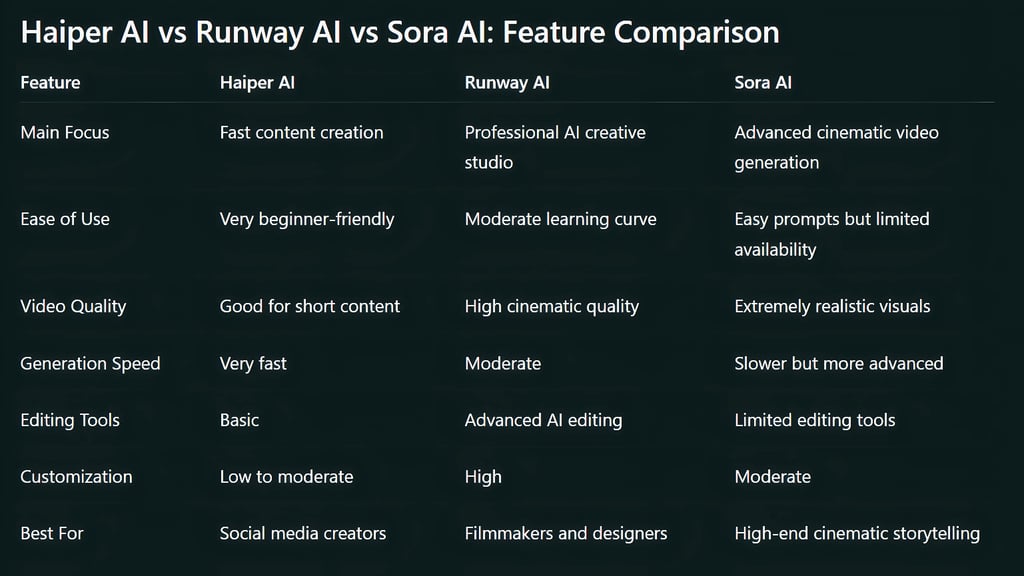
Haiper AI: Haiper often offers free access or low-cost plans, making it accessible to beginners and small creators.
Runway AI: Runway follows a credit-based or subscription model. Higher-quality video generation and advanced tools usually require paid plans.
Sora AI: Sora is still being gradually introduced and may not be fully available to the public yet. Access is currently limited compared to other tools.
Best Use Cases
Haiper AI
Best suited for:
Social media videos
Marketing content
Short animated clips
Quick concept visualization
Fast creative experiments
Runway AI
Best suited for:
Professional video production
AI-assisted editing workflows
Visual effects and compositing
Creative storytelling projects
Film and design production
Sora AI
Best suited for:
Cinematic AI storytelling
Realistic scene generation
Research and experimental video production
Advanced AI filmmaking
The Future of AI Video Creation
AI video generation is evolving at an extremely fast pace. Future models are expected to improve several key areas:
Realistic physics simulation
Character consistency across long scenes
Real-time video generation
Interactive scene editing
AI-assisted filmmaking workflows
As these technologies mature, AI video tools may become essential components of modern content production, advertising, film, and digital storytelling.
Haiper AI, Runway AI, and Sora AI represent three different directions in the evolution of AI video generation.
Haiper AI focuses on speed and simplicity, making it ideal for quick content creation and social media visuals. Runway AI provides a powerful creative studio with advanced editing tools suitable for professional workflows. Sora AI pushes the boundaries of realism and cinematic storytelling with highly detailed video generation.
Each platform serves a different type of creator. Choosing the right tool depends on whether your priority is speed, creative control, or cutting-edge realism.

Advanced Technical Insights into AI Video Models
Token-Based Video Representation
Modern AI video generators do not directly generate videos the way traditional software renders frames. Instead, they convert visual information into tokens, similar to how language models process words.
Each frame of a video is broken into smaller visual units that represent shapes, textures, motion, and colors. These tokens are processed sequentially, allowing the AI to predict how the next frame should look based on the previous one.
This token-based system allows models to:
Maintain temporal consistency
Understand scene relationships
Generate smoother motion across frames
Sora is particularly known for using a video tokenization approach that treats video generation similarly to how language models generate sentences.
Spatio-Temporal Modeling
One of the biggest challenges in AI video generation is maintaining consistency across time. Unlike image generation, video models must track:
object position
lighting changes
camera movement
character motion
To solve this, many modern AI video systems use spatio-temporal neural networks. These networks analyze two dimensions simultaneously:
Spatial dimension: understanding objects and environments within a frame
Temporal dimension: predicting how those objects move between frames
This allows AI to generate motion that appears natural rather than jittery or inconsistent.
Latent Diffusion for Video
Many video generation systems extend the concept of latent diffusion models originally used in image generators. Instead of generating video frames pixel-by-pixel, the model works inside a compressed latent space. This reduces computational cost and allows the system to generate higher-resolution visuals.
The process works in stages:
The prompt is interpreted into a visual representation.
Noise is gradually removed from a latent representation.
Frames are decoded into full-resolution images.
Motion consistency is applied across frames.
Runway and similar systems often rely on this approach to produce smooth video clips efficiently.
Motion Control and Camera Simulation
Advanced AI video models simulate real-world camera techniques.
These may include:
dolly shots
panning movements
zoom transitions
aerial perspectives
handheld camera motion
Some models allow prompt instructions such as:
“cinematic tracking shot,"
“slow camera pan,"
“drone view of a city ”.
The model interprets these descriptions and generates camera motion accordingly. Runway provides more direct control tools for these movements, while Sora attempts to infer them automatically from prompts.
Object Permanence and Scene Memory
A major research challenge in AI video models is object permanence. This refers to the ability of a model to remember objects that temporarily leave the frame and bring them back consistently.
For example:
A character walking behind a wall should reappear correctly.
A moving car should maintain shape and color across frames.
A scene should remain spatially coherent.
Many earlier models struggled with this problem, causing objects to change shape or disappear. Newer systems like Sora attempt to address this by improving internal scene understanding.
Training Data and Model Scale
AI video models require enormous datasets. Training often involves:
millions of video clips
diverse environments
human motion data
cinematic footage
real-world physics interactions
Because video contains far more information than images, training video models requires significantly more compute power and memory.
For example:
one second of video may contain 24–60 frames
each frame contains millions of pixels
motion must be modeled between frames
This makes AI video generation one of the most computationally intensive areas of generative AI.


Simulation of Real-World Physics
New AI video models are beginning to simulate basic physics. These simulations may include:
water flow and splashes
gravity and falling objects
cloth and fabric movement
smoke and particle motion
reflections and shadows
However, perfect physical accuracy remains difficult because AI models learn statistical patterns rather than strict physics rules. Researchers are currently exploring hybrid approaches that combine:
neural networks
physics simulation engines
This could significantly improve realism in future AI video models.
Multimodal Prompt Understanding
AI video models increasingly rely on multimodal inputs. This means the system can generate videos from combinations of:
text prompts
images
sketches
existing videos
style references
For example, a user could provide:
a text description of a scene
a reference image for style
a short video for motion reference
The AI then combines all these signals to generate a new video. This approach allows much more creative control compared to text-only prompts.
Video Length and Memory Constraints
One of the biggest limitations of AI video generation is video length. Long videos require the model to remember large amounts of information across many frames. This significantly increases computational cost.
Most current models generate clips between:
4 seconds
15 seconds
occasionally up to 60 seconds
Researchers are working on new architectures that allow models to maintain longer temporal memory, enabling AI to generate full scenes or short films.
Ethical and Safety Considerations
As AI video technology becomes more realistic, ethical challenges are becoming more important.
These include:
deepfake misuse
misinformation
identity manipulation
copyright concerns
To address these issues, many AI video platforms implement:
watermarking systems
safety filters
content moderation models
Responsible deployment is becoming a major focus as the technology advances.
Emerging Research Directions
Several experimental ideas are currently being explored in AI video research.
These include:
Real-time AI video generation: Creating videos instantly while users interact with prompts.
Interactive AI filmmaking: Allowing creators to control scenes dynamically during generation.
3D-aware video models: Understanding full 3D environments instead of flat frames.
Persistent characters: Generating consistent characters across multiple scenes.
These developments could dramatically change digital filmmaking and content production in the coming years.

FAQ's
Q: What is the main difference between Haiper AI, Runway AI, and Sora AI?
The main difference lies in their focus and capabilities. Haiper AI focuses on fast and simple video generation for quick content creation. Runway AI offers a complete creative studio with AI video generation and editing tools. Sora AI focuses on generating highly realistic and cinematic videos using advanced AI models.
Q: Which AI video generator produces the most realistic videos?
Sora AI is currently known for producing some of the most realistic AI-generated videos. It can create complex environments, natural lighting, and cinematic camera movements that closely resemble real-world footage.
Q: Is Runway AI suitable for professional video production?
Yes, Runway AI is widely used by designers, filmmakers, and content creators because it provides professional tools for video generation, editing, and visual effects. It allows users to generate videos and refine them using built-in AI editing features.
Q: Is Haiper AI good for beginners?
Yes, Haiper AI is designed to be beginner-friendly. Its simple interface and fast generation speed make it easy for users with little or no video editing experience to create AI-generated videos.
Q: Can AI video generators replace traditional video production?
AI video generators are becoming powerful tools, but they are not a complete replacement for traditional filmmaking yet. They are best used for concept creation, marketing content, social media videos, and creative experiments. Professional productions still rely on human direction and complex editing workflows.
Q: What are the typical limitations of AI video generators?
Some common limitations include shorter video duration, occasional inconsistencies in motion or physics, limited character control, and high computational requirements for generating high-quality videos.
Q: Are AI-generated videos safe to use commercially?
This depends on the platform and its licensing terms. Many AI video tools allow commercial use under certain subscription plans, but creators should always review the platform’s usage policy before using generated videos for commercial projects.
Subscribe To Our Newsletter
All © Copyright reserved by Accessible-Learning Hub
| Terms & Conditions
Knowledge is power. Learn with Us. 📚

