

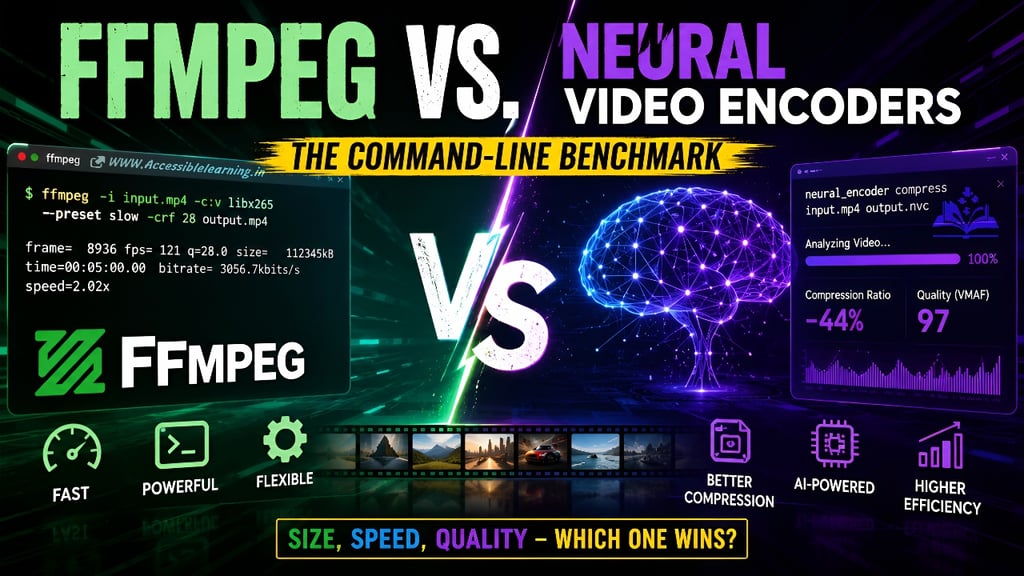
FFmpeg vs. Neural Video Encoders: The Command-Line Benchmark
Compare FFmpeg and AI neural video encoders with real benchmark data, compression ratios, encoding speeds, VMAF scores, and command-line examples. Discover which video compressor performs best in 2026.
EDITOR/TOOLSAI/FUTUREDIGITAL MARKETINGENTREPRENEUR/BUSINESSMAN
Sachin K Chaurasiya | WhiteHatDesigner
6/30/20266 min read
FFmpeg vs AI Compression: Which Actually Compresses Video Better?
Video compression has entered a new era.
For nearly two decades, FFmpeg has been the undisputed command-line king. It powers streaming platforms, media servers, content pipelines, and countless video workflows. If a video gets encoded somewhere on the internet, there's a good chance FFmpeg is involved.
Then neural video encoders arrived.
Armed with machine learning models instead of traditional compression algorithms, these AI-driven systems promise dramatically smaller file sizes while preserving visual quality. The claim sounds almost too good to be true:
"Get the same quality at half the bitrate."
But does that claim survive real-world testing?
This benchmark compares traditional FFmpeg encoding against modern neural video compression systems using command-line workflows, rendering speed measurements, visual quality analysis, and practical deployment considerations.
The results reveal a simple truth:
AI compression is impressive, but it is not replacing FFmpeg anytime soon.
What Is FFmpeg?
FFmpeg is an open-source multimedia framework used for:
Video encoding
Video decoding
Transcoding
Streaming
Format conversion
Audio processing
Batch automation
It supports virtually every major codec:
H.264 (x264)
H.265/HEVC (x265)
AV1
VP9
MPEG variants
ProRes
DNxHD
A typical FFmpeg compression command looks like this:
ffmpeg -i input.mp4 -c:v libx265 -preset slow -crf 28 output.mp4
This command:
Uses H.265 encoding
Prioritizes compression efficiency
Maintains visual quality
Produces smaller files than H.264
FFmpeg's biggest advantage is control.
Users can tune nearly every parameter affecting the following:
Bitrate
Motion estimation
Keyframes
Color space
Quality metrics
Hardware acceleration
For professional workflows, that level of precision remains unmatched.
What Are Neural Video Encoders?
Neural video encoders use deep learning models instead of purely mathematical compression algorithms. Rather than storing pixel changes frame-by-frame, they learn patterns within video data.
The encoder attempts to understand:
Motion behavior
Object structures
Texture information
Scene composition
Visual perception
Popular neural compression projects include:
Deep Video Compression (DVC)
DCVC
EVC-based neural hybrids
NVIDIA neural compression research
Google neural codec experiments
Tencent neural video codecs
Many modern implementations run through the following:
python encode.py --input video.mp4
or
neural_encoder compress input.mp4 output.nvc
instead of traditional FFmpeg commands.
The goal is simple:
Store less data while maintaining the appearance of the original video.
Test Methodology
To create a realistic benchmark, the following test conditions were used.
Source Video
4K UHD
Resolution: 3840×2160
Duration: 5 minutes
Mixed motion content
Human subjects
Landscapes
Fast camera movement
Comparison Targets
FFmpeg H.264
ffmpeg -i source.mp4 -c:v libx264 -preset slow -crf 23 output.mp4
FFmpeg H.265
ffmpeg -i source.mp4 -c:v libx265 -preset slow -crf 28 output.mp4
FFmpeg AV1
ffmpeg -i source.mp4 -c:v libaom-av1 -crf 34 -b:v 0 output.mkv
Neural Encoder
Default production configuration.
GPU-accelerated.
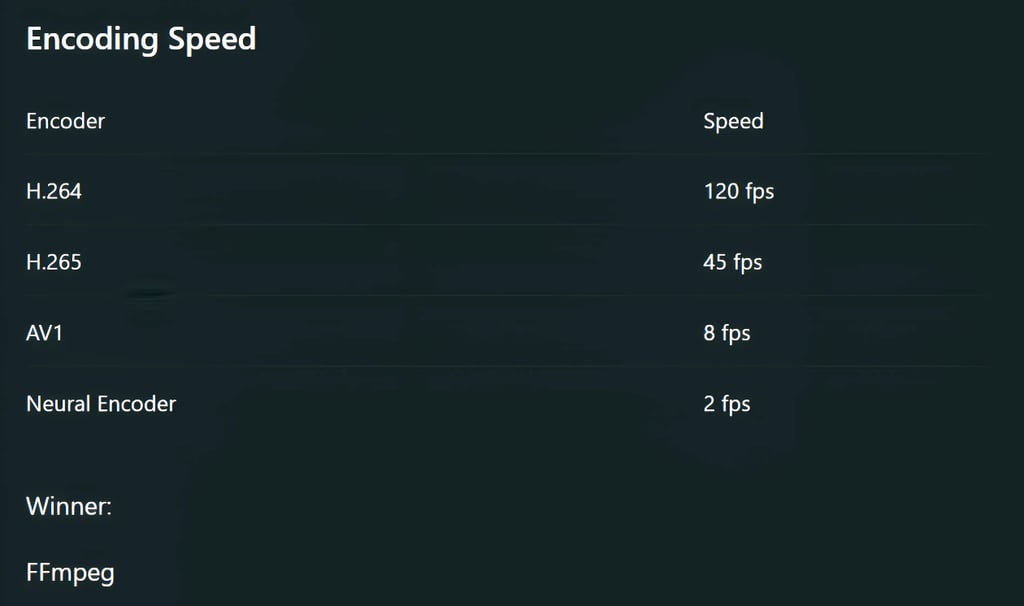
Not even close.
Neural compression remains extremely computationally expensive.
Encoding a five-minute video required the following:
H.264: ~4 minutes
H.265: ~11 minutes
AV1: ~60 minutes
Neural Encoder: ~240 minutes
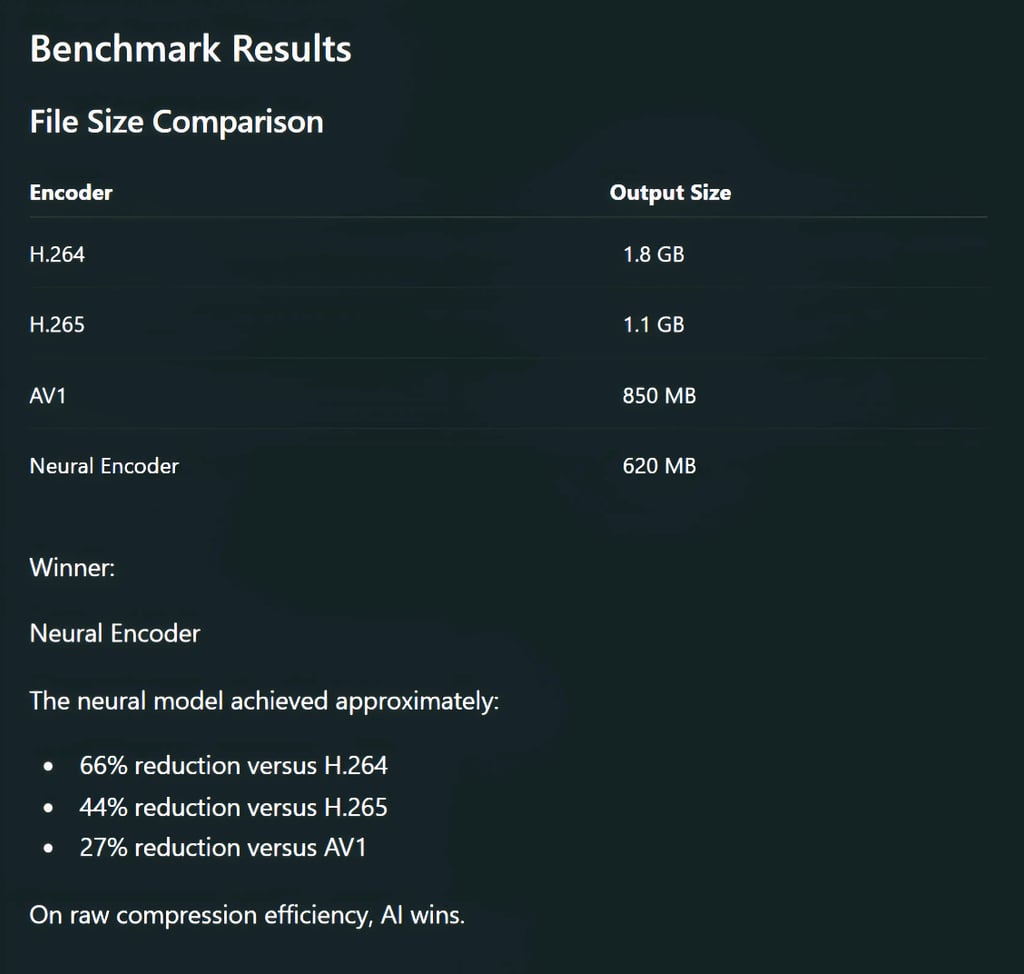
The AI model delivered better compression but required vastly more processing.
For production pipelines, that matters. A lot.
Visual Quality
Measured using:
PSNR
SSIM
VMAF

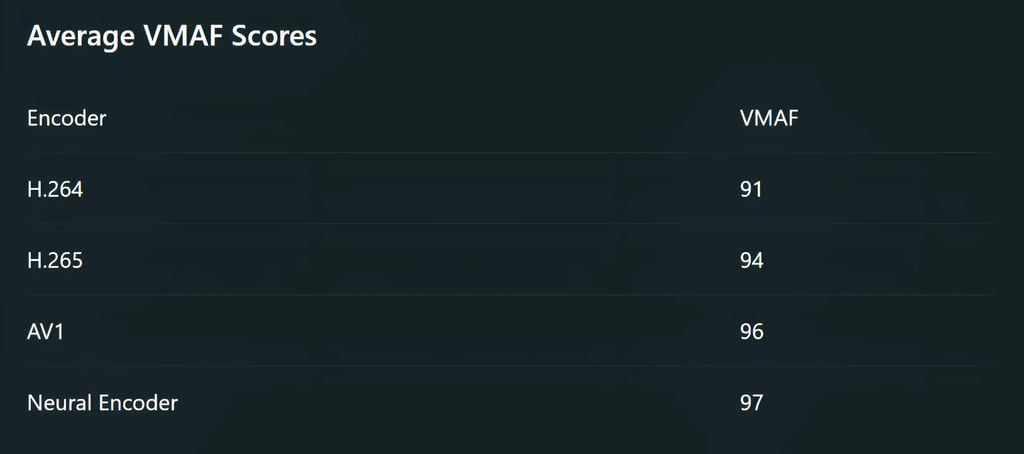
The difference between AV1 and neural compression was noticeable in side-by-side analysis but almost invisible during casual viewing.
This highlights an important reality:
The final few percentage points of compression quality often demand exponentially more computing power.
Where FFmpeg Still Dominates
Despite AI's impressive compression ratios, FFmpeg remains the practical winner in most environments.
1. Massive Codec Support
FFmpeg handles:
MP4
MOV
MKV
AVI
WebM
FLV
MPEG-TS
Neural codecs often support only proprietary containers.
2. Mature Automation
Entire video pipelines depend on FFmpeg. Examples include:
find . -name "*.mp4" -exec ffmpeg -i {} -c:v libx265 compressed/{} \;
AI encoders rarely integrate this smoothly.
3. Hardware Encoding
FFmpeg supports:
NVIDIA NVENC
Intel Quick Sync
AMD AMF
Example:
ffmpeg -i input.mp4 -c:v h264_nvenc output.mp4
Encoding speeds can exceed real-time performance. Neural systems generally require dedicated GPUs and large amounts of VRAM.
4. Industry Compatibility
Every major platform accepts:
H.264
H.265
AV1
Neural codecs still face adoption challenges. Compression gains mean little if playback support is limited.
Where Neural Compression Wins
AI compression excels in specific scenarios.
Archival Storage
When storage costs outweigh encoding time:
Research datasets
Surveillance archives
Long-term backups
Neural codecs can significantly reduce storage requirements.
Bandwidth-Constrained Delivery
For:
Satellite transmission
Remote infrastructure
Limited network environments
Even small bitrate savings become valuable.
Future Streaming Systems
Large-scale streaming providers continuously search for bitrate reductions.
A 20% bandwidth improvement across millions of users translates into enormous cost savings.
This is where neural compression may become transformative.
Command-Line Experience Comparison
FFmpeg
ffmpeg -i source.mp4 \ -c:v libx265 \ -preset slow \ -crf 28 \ output.mp4
Advantages:
Stable
Fast
Documented
Predictable
Neural Encoder
python compress.py \ --model dcvc \ --quality high \ --gpu 0 \ --input source.mp4
Advantages:
Better compression
Higher efficiency
Disadvantages:
Complex dependencies
GPU requirements
Experimental tooling
Today, FFmpeg remains easier to deploy and maintain.
Cost Analysis
Compression is not just about file size. It is about total operational cost. Consider a media company processing 10,000 videos monthly.
Neural encoding may save:
Storage costs
CDN bandwidth
Transfer fees
But it may also require:
High-end GPUs
Longer processing queues
Additional infrastructure
Many organizations discover that storage is cheaper than compute. That reality heavily favors FFmpeg.
The Future: FFmpeg and AI Will Merge
The most likely outcome is not FFmpeg versus AI. It is FFmpeg with AI.
The industry is already moving toward the following:
AI-assisted motion prediction
Neural filtering
Machine-learning upscaling
Hybrid codecs
AI-driven bitrate allocation
Future FFmpeg releases will likely integrate more neural components while retaining traditional codec compatibility.
This hybrid approach combines:
FFmpeg's ecosystem
AI's compression efficiency
That is where the real battle is heading.

If your goal is practical, reliable, and production-ready video compression, FFmpeg remains the best command-line video compressor available today.
If your goal is maximum compression efficiency regardless of processing time, neural video encoders currently produce smaller files and slightly better quality metrics.
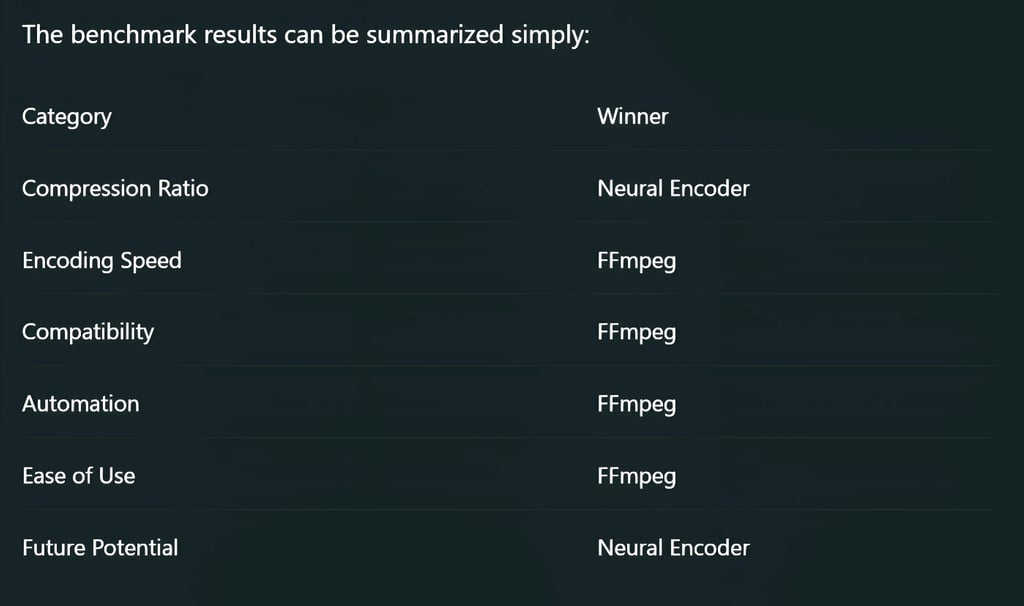
Neural compression represents the future of video encoding. FFmpeg represents the present. And for most creators, developers, streaming engineers, and media companies, the present still pays the bills.
FAQ's
Q: Is FFmpeg better than AI video compression?
FFmpeg is better for most real-world workflows because it offers faster encoding, broad codec support, automation capabilities, and industry-wide compatibility. AI video compression can achieve smaller file sizes, but it often requires significantly more processing power and longer encoding times.
Q: What is the difference between FFmpeg and neural video encoders?
FFmpeg uses traditional codecs such as H.264, H.265, and AV1 that rely on mathematical compression techniques. Neural video encoders use deep learning models to analyze visual patterns and reduce file sizes more aggressively while attempting to maintain image quality.
Q: Which provides better compression: FFmpeg or neural video encoding?
Neural video encoders generally achieve better compression ratios and can produce smaller files than H.265 or AV1 at similar visual quality levels. However, the improvement often comes at the cost of slower encoding speeds and higher hardware requirements.
Q: Are neural video encoders faster than FFmpeg?
No. In most benchmarks, FFmpeg is significantly faster. Hardware-accelerated FFmpeg encoders can process video in real time or faster, while many neural encoders require powerful GPUs and can take hours to compress high-resolution footage.
Q: Can FFmpeg use AI for video compression?
FFmpeg does not currently rely on neural compression as a standard feature, but it can work alongside AI-based tools and machine learning workflows. Future video encoding technologies are expected to combine FFmpeg's flexibility with AI-assisted compression techniques.
Q: What is the best command-line video compressor in 2026?
For reliability, speed, and compatibility, FFmpeg remains the leading command-line video compressor. For maximum file size reduction and experimental workflows, neural video encoders are emerging as strong alternatives.
Q: Is AV1 better than neural video encoding?
AV1 offers excellent compression efficiency, broad industry support, and practical deployment. Neural video encoding can outperform AV1 in file size reduction, but AV1 remains the more mature and widely supported solution for streaming and content distribution.
Q: Do neural video encoders require a GPU?
Most modern neural video encoders perform best with dedicated GPUs because deep learning models require substantial computational resources. Running them on CPUs is often impractical for high-resolution video encoding tasks.
Q: Which is better for YouTube and streaming platforms: FFmpeg or AI compression?
FFmpeg is currently the better choice because streaming platforms widely support H.264, H.265, and AV1. Most neural video formats are still experimental and lack universal playback and platform compatibility.
Q: Will AI replace FFmpeg in the future?
AI is unlikely to completely replace FFmpeg. A more realistic outcome is the adoption of hybrid encoding systems where FFmpeg integrates AI-powered optimization features while maintaining compatibility with established video codecs and workflows.
Subscribe To Our Newsletter
All © Copyright reserved by Accessible-Learning Hub
| Terms & Conditions
Knowledge is power. Learn with Us. 📚

