

DreamBooth vs LoRA vs Textual Inversion: The Complete Guide to AI Fine-Tuning
A detailed comparison of DreamBooth, LoRA, and Textual Inversion that explains how each method works, their technical differences, real-world strengths, and when to use them. This guide helps creators, developers, and AI enthusiasts choose the right fine-tuning approach for personalized image generation, consistent characters, and advanced style training.
AI ART TOOLSEDITOR/TOOLSAI/FUTURECOMPANY/INDUSTRY
Sachin K Chaurasiya
12/10/20256 min read
As AI image generation continues to evolve, the need for personalization has become stronger than ever. Whether you're building branded visuals, designing characters, or training AI assistants, you eventually reach the limits of text prompts alone. That’s where DreamBooth, LoRA, and Textual Inversion come in.
These three methods allow you to inject new concepts into a model. The difference is how they do it and how much control they give you. Below is a deeper look at how each one works, their strengths, limitations, and how to pick the right method for your project.
DreamBooth: Deep Personalization with Full Model Training
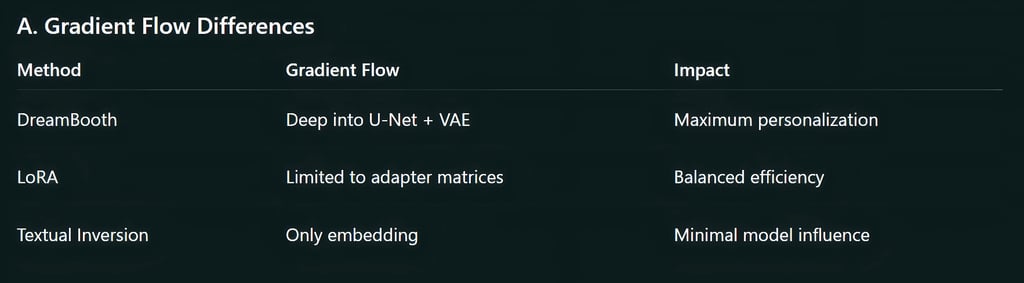
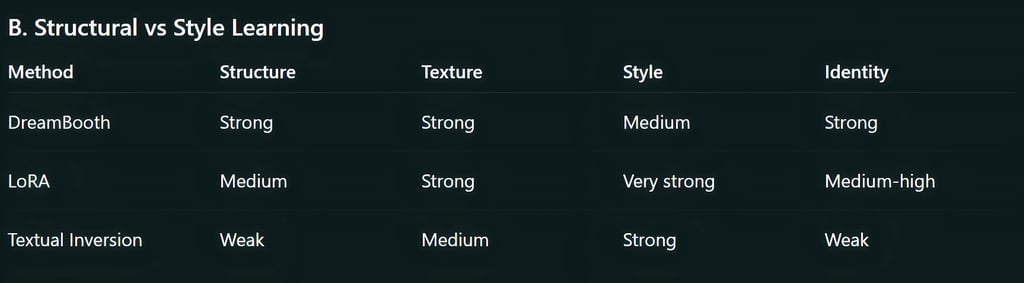
DreamBooth stands out for its ability to capture identity, style, and structure with high accuracy. It trains many parts of the diffusion model, which makes it the strongest method for realism and detail.
How DreamBooth Works (Expanded)
It fine-tunes the full model or a major subset of layers.
It assigns a rare token like sks_person or drm_style to your training concept.
It maps the visual identity to that token using high-weight updates.
It uses prior preservation to avoid overfitting by comparing the subject to similar classes.
Why It Captures Likeness So Well
DreamBooth doesn’t just learn appearances. It learns:
Facial geometry
Body proportions
Surface details
Lighting behavior
Scene transferability
Specific textures and patterns
This gives it an advantage in scenarios where precision matters.
More Strengths
Works extremely well with humans and pets
Retains identity across angles, distances, poses
Good for cinematic storytelling and animation frames
Great for professional brand work: shoes, jewellery, packaging
Handles extreme environments (underwater, night, stylized worlds)
More Limitations
File sizes balloon to several gigabytes
Not ideal for users with limited GPU memory
Combining multiple DreamBooth models often breaks output consistency
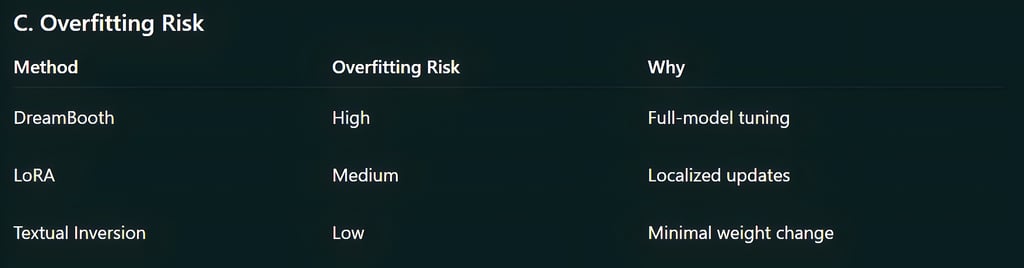
Training too long creates “identity collapse,” where all outputs look identical
Best Real-World Uses
Personal avatars for videos and social content
E-commerce product libraries
High-end advertising campaigns
Character-driven narratives
Fashion catalog generation
Professional-Level Applications
Digital doubles for filmmakers
Brand-specific advertising model
Photoreal characters in 3D pipelines
Personalized AI influencers


LoRA: Lightweight, Modular, and Flexible Fine-Tuning
LoRA is designed to give you fine-tuning without the heavy cost of full-model training. Instead of modifying the model’s original weights, it injects low-rank matrices that activate only when needed.
How LoRA Works (Expanded)
It modifies only specific attention layers or U-Net blocks.
The model remains unchanged; LoRA adds extra parameters around it.
These parameters push the model in a certain direction when the LoRA is applied.
You can control LoRA influence using lora:filename:weight.
Why LoRA Is So Popular
LoRA strikes the perfect balance between quality and efficiency.
More Strengths
Creates multiple versions of a concept (poses, lighting, outfits)
Training is fast and predictable
Works extremely well across different base models (SD 1.5, SDXL, Flux)
Allows stacking multiple LoRAs in one prompt
A single LoRA can represent a style, character, environment, or camera setup
More Technical Benefits
Supports rank scaling, allowing you to increase detail by increasing rank
Adapters load instantly compared to swapping gigabytes
Doesn’t cause catastrophic forgetting in the base model
More Limitations
High-rank LoRAs become large and slow
Very detailed subjects (faces, objects) may require mixed datasets
If trained poorly, it can leak style into unrelated prompts
Needs periodic testing across many prompts to avoid drift
Best Real-World Uses
Anime and art style libraries
Character collections for game or comic production
Photography vibes like “cinematic portrait” or “depth-heavy wide angle”
Stylized assets for game engines
Clothing design exploration
Professional-Level Applications
Multi-style pipelines for studios
Character packs for comics and anime
Corporate environments with multiple brand variants
Fashion batch generation with outfit-specific LoRAs


Textual Inversion: Micro-Training for Vocabulary Expansion
Textual Inversion teaches the model a new “word” by replacing an embedding. This embedding (token) represents a concept inside the model’s text encoder.
How Textual Inversion Works (Expanded)
You select a token like <myConcept>.
You feed several reference images.
The system learns a vector embedding that activates certain model features.
The base model remains untouched.
Because no model weights change, it’s the safest and smallest fine-tuning method.
More Strengths
Perfect for stylistic ideas like brush patterns, mood, or texture
Easy to share because it’s just a few kilobytes
Doesn’t break compatibility with other models
Great for building “prompt packs” for artists
More Limitations
Struggles with complex structures like faces or anatomy
Doesn’t handle 3D rotation well
Produces inconsistent identity
Needs strong prompt engineering to get the best results
Best Real-World Uses
Creating custom keywords for style packs
Adding unique art mediums (oil splatter, mosaic, charcoal, neon chrome)
Embedding brand-specific textures like patterns or fabrics
Preserving the look of a specific brushstroke or illustration style
Professional-Level Applications
Prompt engineering for style tokens
Texture libraries for game studios
Custom art direction keywords
Lightweight modifiers for AI art communities

Feature-by-Feature Deep Comparison
Accuracy & Fidelity
DreamBooth: Highest
LoRA: High but depends on rank
Textual Inversion: Medium for simple concepts, low for identity
Compute Requirements
DreamBooth: Heavy. Needs strong GPUs (12–24 GB VRAM).
LoRA: Medium. Works even on 8 GB GPUs.
Textual Inversion: Very light. Works almost anywhere.
File Size Impact
DreamBooth: Large model files
LoRA: Small add-ons
Textual Inversion: Tiny embeddings
Ease of Sharing
DreamBooth: Hard. File sizes are big.
LoRA: Very easy. Community uses them widely.
Textual Inversion: Extremely easy.
Prompt Control
DreamBooth: Strong control
LoRA: Adjustable using weights
Textual Inversion: Depends heavily on prompt phrasing
Mixing Multiple Concepts
DreamBooth: Difficult, can override each other
LoRA: Designed for stacking
Textual Inversion: Mixes well but weak power
When to Use What: Practical Scenarios
You want to create a consistent AI character for your brand
Choose DreamBooth.
You’re building a character library for a comic
Choose LoRA.
You want to teach the model a new art style or pattern
Choose Textual Inversion.
You have limited GPU power
Choose LoRA or Textual Inversion.
You need a model that can handle many different concepts at once
Choose LoRA.
You want the most realistic human likeness
Choose DreamBooth.
Each method has a clear purpose:
DreamBooth gives unmatched realism and character consistency.
LoRA offers flexibility, speed, and modular control.
Textual Inversion is simple and lightweight for stylistic concepts.
Choosing the right method is less about power and more about your creative goal. Many professionals mix these methods:
DreamBooth for the identity, LoRA for the style, and Textual Inversion for the final polish.

FAQ's
Q: Which method gives the highest accuracy for character likeness?
DreamBooth gives the strongest identity accuracy because it updates many layers inside the model. It learns facial structure, proportions, and fine details better than LoRA or Textual Inversion.
Q: Is LoRA better for styles or characters?
LoRA works well for both, but it’s especially strong for styles and stylized characters. It can handle identity too, but it won’t match DreamBooth’s precision for real humans.
Q: Does Textual Inversion work for faces?
Not reliably. Textual Inversion is best for textures, patterns, brush styles, and small creative concepts. It struggles with anatomy, structure, and likeness.
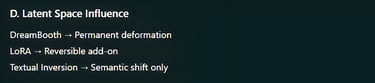
Q: Do these methods change the base model permanently?
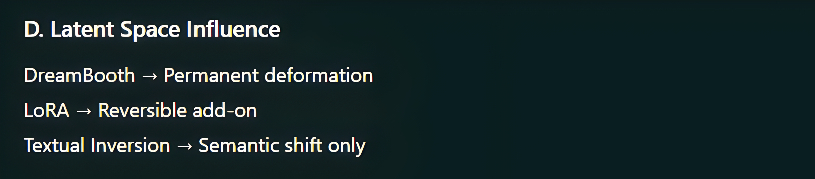
DreamBooth: Yes, it directly modifies model weights.
LoRA: No, it adds small adapter layers that can be turned on or off.
Textual Inversion: No, it only adds a new text embedding.
Q: Can I combine multiple LoRAs together?
Yes. LoRAs are designed to stack, which makes them great for adding multiple styles, characters, or effects in one prompt.
Q: How many images do I need for training?
DreamBooth: 10–20 images
LoRA: 10–30 images depending on detail
Textual Inversion: 3–12 images
Good variation in poses and lighting improves results.
Q: Which option is best for low-end GPUs?
LoRA and Textual Inversion are ideal for low VRAM systems. DreamBooth usually needs more power and memory.
Q: Can these fine-tuning methods be used on SDXL or newer models?
Yes. DreamBooth, LoRA, and Textual Inversion all support newer models like SDXL, although SDXL-specific training settings are often required for best quality.
Subscribe to Frontier Intelligence
All © Copyright reserved by Accessible-Learning Hub
| Terms & Conditions
Accessible Learning Hub — Actionable clarity for high-agency minds.
Weekly breakdowns on AI breakthroughs, capital flow, and human performance systems. Zero fluff.