

Desktop AI: How to Compress and Run Massive LLMs Locally
Learn how AI model compression techniques like LLM quantization and neural network pruning make it possible to run massive AI models locally. Discover how to run AI locally in 2026 using standard laptops and desktops without expensive server hardware.
AI ASSISTANTA LEARNINGENTREPRENEUR/BUSINESSMANDIGITAL MARKETING
Sachin K Chaurasiya | WhiteHatDesigner
6/23/20267 min read


You Don't Need a Data Center. You Need a Smaller Model.
A few years ago, running a large language model (LLM) meant renting cloud servers packed with expensive GPUs. Today, people are running multi-billion parameter AI models directly from laptops, mini PCs, and desktop workstations.
The secret is not more hardware.
The secret is compression.
Modern AI models are often far larger than they need to be. Through techniques such as AI model compression, LLM quantization, and neural network pruning, developers can reduce memory requirements dramatically while maintaining most of the model's capabilities.
This shift is transforming desktop AI. Instead of sending every request to a cloud provider, users can run powerful AI assistants locally, keeping costs low, improving privacy, and eliminating internet dependency.
If you're interested in how to run AI locally in 2026, understanding compression is no longer optional. It's the technology that makes local AI practical.
Why Large Language Models Are So Big
Before discussing compression, it's important to understand why modern models consume enormous amounts of memory. A language model consists of billions of parameters. These parameters are essentially numerical values learned during training.
For example:
A 7B model contains roughly 7 billion parameters
A 13B model contains roughly 13 billion parameters
A 70B model contains roughly 70 billion parameters
Most original models are stored using 16-bit floating-point precision (FP16).
That means:
7 billion parameters × 2 bytes ≈ 14 GB
And that's before accounting for:
Runtime memory
Context windows
Attention caches
Operating system overhead
This is why a seemingly modest 7B model can easily require more memory than many laptops possess. Compression changes the equation.
What Is AI Model Compression?
AI model compression refers to techniques that reduce a model's size while preserving as much performance as possible.
The goal is simple:
Use less RAM
Use less VRAM
Increase inference speed
Lower power consumption
Maintain acceptable accuracy
Compression is what enables modern desktop AI applications to function on consumer hardware.
The two most important methods are the following:
Quantization
Neural Network Pruning
Let's examine each in detail.
LLM Quantization Guide: The Most Important Compression Technique
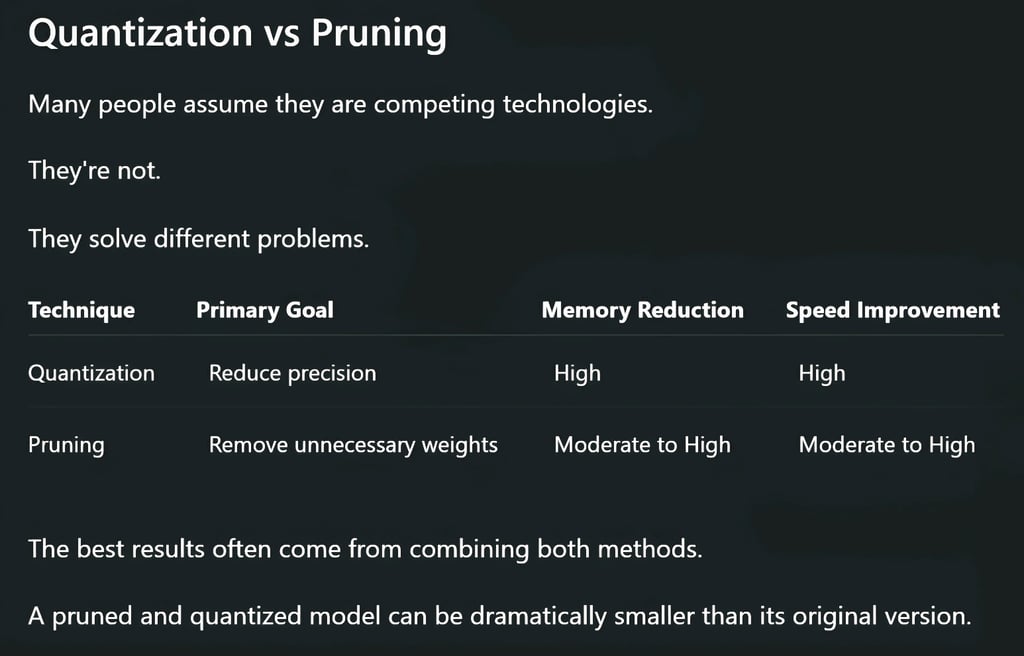
Quantization is the process of reducing the numerical precision used to store model parameters.
Instead of storing every parameter using 16 bits, the model uses fewer bits.
Think of it like compressing a high-resolution image.
The image becomes smaller while remaining visually similar.
The same principle applies to language models.
How Quantization Works
Original model:
Parameter = 1.824563
FP16 storage:
1.824563
Quantized storage:
1.82
The value loses some precision but often retains enough information for practical use. Across billions of parameters, this reduction creates enormous memory savings.
Common Quantization Levels
FP16 (16-bit)
Advantages:
Highest accuracy
Closest to original model
Disadvantages:
Largest memory footprint
Typical use:
Research
Fine-tuning
Training
INT8 (8-bit)
Advantages:
Roughly half the memory usage
Minimal quality loss
Disadvantages:
Slight decrease in precision
Typical use:
High-performance local inference
Q6 and Q5 Quantization
Popular among local AI users.
Advantages:
Excellent balance of quality and size
Significant memory reduction
Typical use:
Daily desktop AI workloads
Q4 Quantization
One of the most popular formats in local AI communities.
Advantages:
Massive memory savings
Fast inference
Disadvantages:
Slightly lower reasoning performance
Typical use:
Consumer laptops
Mid-range desktop systems
Q2 and Lower
Advantages:
Extremely small footprint
Disadvantages:
Noticeable quality degradation
Typical use:
Experimental deployments
Real-World Example of Quantization
Consider a 13B model.
Original FP16 version:
Approximately 26 GBQ4 quantized version:
Approximately 7–8 GB
The model becomes small enough to run on many consumer systems. This is why a laptop that could never load the original model can suddenly run it smoothly.

Why Quantization Works Surprisingly Well
Many people assume reducing precision will destroy performance. In practice, large neural networks contain significant redundancy. Researchers discovered that models can tolerate small numerical approximations without losing much capability.
This is especially true for:
Chat applications
Coding assistants
Content generation
Research workflows
Local AI agents
The difference between FP16 and a well-made Q4 model is often much smaller than users expect.
What Is Neural Network Pruning?
While quantization reduces numerical precision, pruning removes unnecessary parts of the model entirely.
The concept is straightforward:
Not every connection inside a neural network contributes equally to output quality.
Some connections matter enormously.
Others barely matter at all.
Pruning identifies low-value parameters and removes them.
Understanding Neural Network Pruning
Imagine a model containing:
10 billion connections
Analysis reveals that:
2 billion connections contribute very little
Those connections can be removed.
The result:
Smaller model
Faster inference
Lower memory usage
Ideally, performance remains nearly identical.
Types of Neural Network Pruning
Unstructured Pruning
Removes individual weights throughout the network.
Advantages:
Maximum compression
Disadvantages:
Hardware optimization can be difficult
Structured Pruning
Removes entire groups of neurons, channels, or layers.
Advantages:
Better hardware efficiency
Easier deployment
Disadvantages:
Slightly less aggressive compression
Dynamic Pruning
Activates only relevant parts of a model during inference.
Advantages:
Improved efficiency
Reduced computational requirements
This approach is becoming increasingly important in modern AI systems.

How Desktop AI Uses Compression Today
Nearly every major local AI ecosystem relies on compression. Popular formats include:
GGUF
GPTQ
AWQ
EXL2
These formats are specifically designed for efficient local inference. Compression allows users to run the following:
Coding assistants
Writing assistants
Research agents
Local chatbots
Knowledge management systems
without enterprise hardware.
How to Run AI Locally in 2026
The process has become surprisingly accessible.
Step 1: Choose a Model
Common categories include:
7B models
8B models
14B models
32B models
70B models
The larger the model, the more memory required.
Step 2: Select a Quantized Version
Instead of downloading FP16 versions, most users choose:
Q4
Q5
Q6
These versions offer excellent efficiency.
Step 3: Use a Local Inference Tool
Popular local AI platforms support compressed models directly. Most handle:
CPU inference
GPU acceleration
Hybrid memory loading
automatically.
Step 4: Optimize Context Size
Longer context windows consume more memory.
Reducing context size often produces substantial performance improvements on limited hardware.
Hardware Requirements in 2026
Thanks to AI model compression, hardware requirements have dropped significantly.
Entry-Level Laptop
Suitable for:
Small quantized models
Personal assistants
Basic coding tasks
Mid-Range Desktop
Suitable for:
7B–14B models
Research workflows
Document analysis
High-End Workstation
Suitable for:
32B–70B models
Multi-agent systems
Advanced reasoning tasks
Compression is the reason these deployments are possible. Without quantization and pruning, most local AI projects would remain inaccessible to average users.
The Privacy Advantage of Local AI
Cloud AI systems require sending prompts to external servers. Local AI changes that.
Benefits include:
Greater privacy
Reduced latency
Offline operation
Lower long-term cost
Full control over data
For businesses handling sensitive information, local inference is becoming increasingly attractive. Compression is the enabling technology behind that shift.


The Future of AI Model Compression
The next generation of compression techniques is already emerging. Researchers are exploring:
Adaptive quantization
Sparse neural architectures
Dynamic parameter activation
Mixture-of-experts compression
Hardware-aware pruning
Future models will likely become smaller and more efficient without sacrificing capability.
The trend is clear:
Bigger AI models do not necessarily require bigger hardware.
They require smarter optimization.
The rise of desktop AI is not being driven by faster GPUs alone. It's being driven by compression.
LLM quantization reduces memory requirements by lowering numerical precision. Neural network pruning removes unnecessary weights and connections. Together, these techniques transform enormous AI models into practical tools that can run on ordinary computers.
If you're exploring how to run AI locally in 2026, understanding AI model compression is one of the most valuable skills you can learn. The future of local AI isn't about building larger models. It's about making powerful models efficient enough to fit on the hardware people already own.
That is how billion-parameter intelligence ends up running on a laptop sitting on your desk.
FAQ's
Q: What is AI model compression?
AI model compression is the process of reducing the size and computational requirements of an AI model while preserving most of its performance. Common techniques include quantization, neural network pruning, knowledge distillation, and weight sharing. Compression allows large language models (LLMs) to run efficiently on consumer hardware.
Q: What is LLM quantization, and why is it important?
LLM quantization is a technique that reduces the numerical precision of model weights, such as converting 16-bit values to 8-bit or 4-bit formats. This significantly lowers memory usage and increases inference speed, making it possible to run large AI models on laptops and desktop PCs.
Q: Can I run AI models locally without a powerful GPU?
Yes. Thanks to modern AI model compression methods, many quantized models can run on CPUs or entry-level GPUs. Smaller models in Q4 or Q5 formats are often capable of delivering strong performance on standard laptops with sufficient RAM.
Q: What is neural network pruning?
Neural network pruning removes less important weights, neurons, or connections from a model. By eliminating redundant parameters, pruning reduces model size, lowers resource consumption, and can improve inference efficiency without causing major accuracy loss.
Q: How much RAM do I need to run an LLM locally?
The required RAM depends on the model size and quantization level. A 7B model in Q4 format can often run with 8–16 GB of RAM, while larger models such as 13B or 32B may require 16–64 GB or more for smooth performance.
Q: What is the best quantization level for local AI?
For most users, Q4 and Q5 quantization offer the best balance between performance, memory efficiency, and response quality. They provide significant size reductions while maintaining strong reasoning and text-generation capabilities.
Q: Is a quantized AI model less accurate than the original model?
A quantized model may lose a small amount of accuracy compared to the original FP16 version, but modern quantization techniques minimize this impact. In many real-world tasks, users notice little to no difference in output quality.
Q: Why are more people choosing to run AI locally in 2026?
Users increasingly prefer local AI because it offers better privacy, lower long-term costs, offline functionality, faster response times, and full control over data. Advances in model compression have made local AI practical for everyday use.
Q: What are the benefits of running AI locally instead of using cloud AI?
Running AI locally provides:
Enhanced privacy and data security
No recurring API fees
Offline access
Reduced latency
Greater customization and control
These advantages are driving rapid adoption of desktop AI solutions.
Q: What are the most popular AI model formats for local inference?
Some of the most widely used formats for local AI deployment include GGUF, GPTQ, AWQ, and EXL2. These formats are optimized for compressed models and efficient inference on consumer hardware.
Q: Can a laptop run a 70B parameter model?
Yes, but typically only in highly compressed formats and often with partial offloading to system RAM or storage. Performance varies based on available RAM, CPU, GPU, and the specific quantization method used.
Q: What is the future of AI model compression?
Future AI model compression techniques are expected to include adaptive quantization, sparse neural networks, dynamic pruning, and hardware-aware optimization. These advancements will make increasingly powerful AI models accessible on everyday devices.
Subscribe To Our Newsletter
All © Copyright reserved by Accessible-Learning Hub
| Terms & Conditions
Knowledge is power. Learn with Us. 📚

