

ChatGPT vs GitHub Copilot vs Claude: Which AI is Best for Programming in 2026?
Compare ChatGPT, GitHub Copilot, and Claude for programming in 2026. Explore features, performance, and use cases and find the best AI coding assistant for your workflow.
AI ASSISTANTAI/FUTUREPROGRAMMING
Sachin K Chaurasiya
4/17/20264 min read
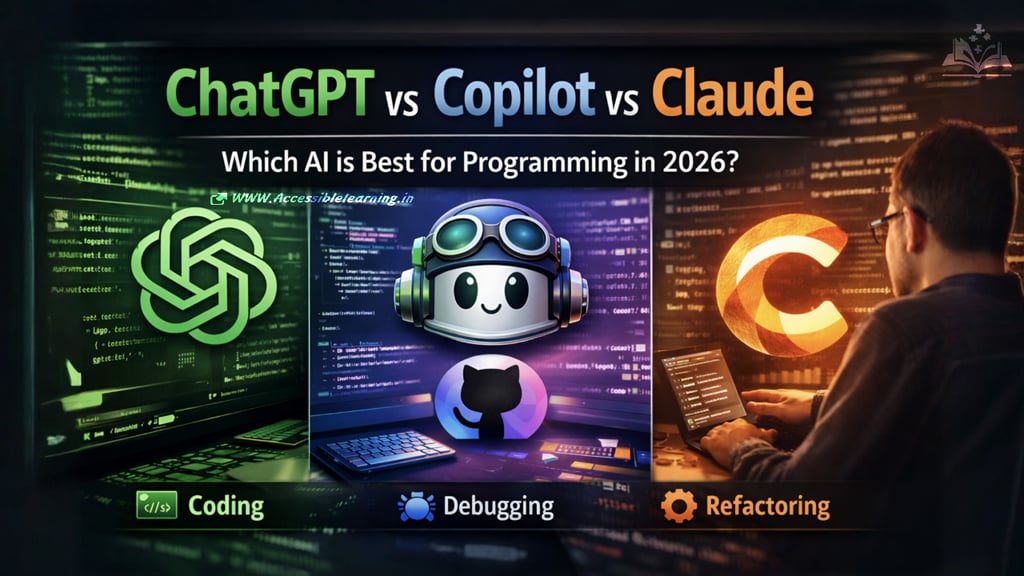
AI coding assistants are no longer just helpers; they’re becoming core parts of the development workflow. Tools like ChatGPT, GitHub Copilot, and Claude now support everything from writing functions to reviewing entire codebases.
This guide goes deeper into how they actually perform in real-world programming scenarios, including advanced use cases, limitations, and practical workflows.
ChatGPT for Programming
Where it really shines
ChatGPT works best when programming involves thinking, planning, or problem-solving, not just typing code.
Advanced capabilities
Multi-step debugging with explanations
Converts pseudocode into working implementations
Generates test cases and edge-case handling
Helps design APIs, databases, and system architecture
Can translate code between languages (Python → JavaScript, etc.)
Unique advantage
ChatGPT acts like a thinking partner, not just a code generator. You can ask why something broke, not just how to fix it.
Real-world use cases
Breaking down complex errors
Learning new frameworks quickly
Writing documentation alongside code
Brainstorming feature implementations
Limitations to keep in mind
May generate outdated or non-optimized solutions
Needs clear prompts for accurate output
Not ideal for real-time coding flow
GitHub Copilot for Programming
Where it really shines
GitHub Copilot is built for speed and momentum inside your editor.
Advanced capabilities
Context-aware inline suggestions
Autocompletes entire functions and classes
Learns patterns from your current project
Supports comments-to-code generation
Integrates with testing and debugging tools in IDE
Unique advantage
Copilot reduces the friction of writing code. It’s like having autocomplete on steroids.
Real-world use cases
Writing repetitive logic
Generating CRUD operations
Speeding up frontend or backend scaffolding
Filling in boilerplate code
Limitations to keep in mind
Can suggest incorrect or insecure code
Limited understanding of full system architecture
Less helpful for reasoning-heavy tasks
Claude for Programming
Where it really shines
Claude excels in deep reasoning, long-context understanding, and structured output.
Advanced capabilities
Processes large files and entire repositories
Performs detailed code reviews
Refactors messy or legacy code
Improves readability and maintainability
Generates structured documentation
Unique advantage
Claude is particularly strong when working with big, complex systems where context matters.
Real-world use cases
Reviewing production code
Refactoring large codebases
Improving code quality and structure
Writing technical documentation
Limitations to keep in mind
Slower compared to Copilot for quick tasks
Fewer integrations with development tools
Less suited for rapid iteration
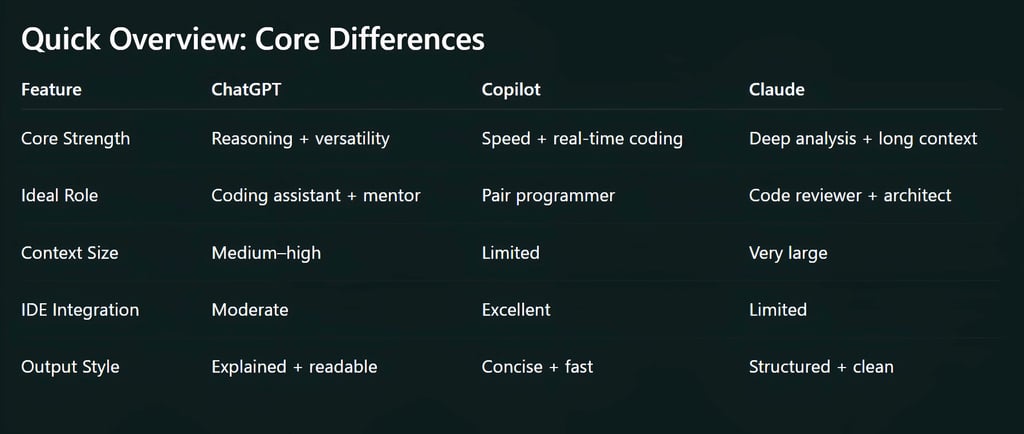
Deep Feature Comparison
1. Code Quality & Maintainability
Claude produces the cleanest, most structured code
ChatGPT balances readability and logic
Copilot focuses on speed over structure
2. Debugging Intelligence
ChatGPT is best at explaining errors step-by-step
Claude provides deeper analysis for complex issues
Copilot offers minimal debugging help
3. Speed & Productivity
4. Learning Curve Support
ChatGPT is the best learning tool
Claude is helpful for advanced developers
Copilot assumes you already know what you're doing
5. Context Awareness
Claude handles massive context (large codebases)
ChatGPT handles moderate context well
Copilot is limited to local file context
Security & Code Reliability
This is an area many developers overlook.
ChatGPT
Can suggest secure patterns if prompted
Requires validation for production use
Copilot
May generate insecure or outdated snippets
Developers must review carefully
Claude
More consistent in writing safe, structured code
Better for reviewing security issues in code
Key takeaway: No matter which tool you use, human review is still critical.
Performance in Different Programming Languages
Strong across all tools
Python
JavaScript / TypeScript
Java
C++
Better handled by ChatGPT & Claude
Rust
Go
Functional languages (Haskell, Lisp)
Copilot advantage
Web development stacks (React, Node.js, HTML/CSS)

AI-Assisted Development Workflow (Pro Strategy)
Here’s how many experienced developers combine all three tools:
Step 1: Planning
Use ChatGPT
Define "architecture."
Break down features
Step 2: Implementation
Use Copilot
Write code quickly inside the IDE.
Step 3: Debugging
Use ChatGPT
Understand and fix errors
Step 4: Optimization
Use Claude
Refactor and improve code quality
This hybrid workflow gives you speed + intelligence + quality.
Ecosystem & Developer Experience
ChatGPT
Works across browsers, APIs, and tools
Supports plugins and automation
Flexible for different workflows
Copilot
Seamless IDE experience
Minimal setup required
Designed specifically for developers
Claude
CLI-based workflows emerging
Strong for document and code analysis
Focused more on depth than integrations
Pricing Snapshot (2026)
ChatGPT: Tiered plans with advanced features
Copilot: Subscription for individual and enterprise use
Claude: Free + Pro + enterprise options
When to Use Each Tool (Practical Guide)
Use ChatGPT when:
You need explanations or learning support
You’re debugging complex issues
You’re designing systems
Use Copilot when:
You want to code faster
You’re working inside an IDE
You need quick suggestions
Use Claude when:
You’re working with large or complex codebases
You need high-quality, maintainable code
You’re reviewing or refactoring
Each tool represents a different layer of modern development:
Copilot handles execution speed
ChatGPT handles reasoning and understanding
Claude handles depth and refinement
The real advantage is not choosing one but using them together strategically. AI won’t replace developers, but developers who use AI effectively will outperform those who don’t.


FAQ's
Q: Which AI tool is best for programming in 2026?
There’s no single winner. GitHub Copilot is best for writing code quickly inside an IDE; ChatGPT is ideal for debugging and learning; and Claude is strongest for code quality and large-scale analysis. The best choice depends on your workflow.
Q: Is ChatGPT better than Copilot for coding?
ChatGPT is better for understanding and problem-solving, while Copilot is better for speed and real-time code generation. If you want explanations and guidance, go with ChatGPT. If you want to write code faster inside your editor, Copilot is more efficient.
Q: Can Claude replace ChatGPT or Copilot for developers?
Claude can handle many advanced programming tasks, especially refactoring and analyzing large codebases, but it doesn’t fully replace ChatGPT’s teaching ability or Copilot’s real-time coding support. It works best as a complementary tool.
Q: Which AI coding assistant is best for beginners?
ChatGPT is the best choice for beginners because it explains concepts clearly, helps debug errors step by step, and supports learning across multiple languages.
Q: Is GitHub Copilot worth it for professional developers?
Yes. GitHub Copilot is widely used by professionals because it significantly speeds up development, reduces repetitive work, and integrates seamlessly into coding environments.
Q: Which AI tool is best for large codebases?
Claude is the best option for large codebases due to its long context window and strong reasoning ability, making it effective for reviewing, refactoring, and understanding complex systems.
Q: Are AI coding tools reliable for production code?
AI tools can generate high-quality code, but they are not 100% reliable. Developers should always review, test, and validate outputs for performance, security, and correctness before using them in production.
Q: Do these AI tools support multiple programming languages?
Yes. ChatGPT, Copilot, and Claude all support major languages like Python, JavaScript, Java, and C++. They can also handle less common languages, though performance may vary depending on the ecosystem.
Q: Which AI is best for debugging code?
ChatGPT is generally the best for debugging because it can explain errors, identify root causes, and guide you step by step toward a solution.
Q: Can AI replace software developers?
No. AI tools enhance productivity but don’t replace developers. They assist with coding, debugging, and optimization, but human judgment, creativity, and system design skills remain essential.
Subscribe To Our Newsletter
All © Copyright reserved by Accessible-Learning Hub
| Terms & Conditions
Knowledge is power. Learn with Us. 📚

