

Canva AI vs Adobe Firefly: Which AI Design Tool Should You Use?
Compare Canva AI vs Adobe Firefly in 2026 with a deep, practical breakdown of features, pricing, output quality, and real-world use cases. Discover which AI design tool is better for beginners, professionals, and content creators.
ARTIFICIAL INTELLIGENCE & FUTURE TECH
Sachin K Chaurasiya
4/16/20265 min read
AI is no longer just a feature in design tools. It’s becoming the core engine behind how content is created. Two platforms leading this shift are Canva AI (Magic Studio) and Adobe Firefly.
Both are powerful, but they solve different problems. One focuses on speed and accessibility, while the other focuses on precision and professional-grade output. This guide goes deeper into what actually matters when choosing between them.
What is Canva AI?
Canva AI is part of Canva’s Magic Studio, designed to simplify the entire creative workflow. It doesn’t just generate images. It helps create complete content pieces from idea to final output.
Expanded Canva AI Capabilities
Magic Design (Prompt-to-Design)
Turn a simple idea into a full design layout with images, fonts, and structure.Magic Write (AI Copy Assistant)
Generate blog content, captions, product descriptions, and scripts.Text-to-Image Generator
Create visuals in multiple styles like realistic, artistic, or abstract.Magic Edit & Magic Expand
Modify parts of an image using prompts or extend visuals beyond original boundaries.Brand Kit Integration
Automatically apply brand colors, fonts, and styles across designs.Bulk Content Generation
Create multiple variations of designs for ads or social media campaigns.AI Video Creation
Convert text into video with animations, transitions, and music.Real-Time Collaboration
Teams can edit and generate content together in shared projects.
Canva AI works best as a content production system, not just a design tool.
Canva AI Strengths
End-to-end content workflow
Speed and automation
Strong collaboration features
Beginner accessibility
Canva AI Limitations
Limited deep customization
Less control over fine artistic details
Output can feel template-driven
What is Adobe Firefly?
Adobe Firefly is a generative AI platform deeply integrated into Adobe’s ecosystem, including Photoshop, Illustrator, and Premiere Pro. It focuses on precision, control, and high-quality output.
Expanded Adobe Firefly Capabilities
Text-to-Image Generation
Create highly detailed and photorealistic visuals.Generative Fill (Photoshop)
Add, remove, or replace elements in an image seamlessly.Generative Expand
Extend images with context-aware AI generation.Text Effects & Typography Generation
Apply textures, styles, and materials directly to text.Vector Generation (Illustrator)
Convert prompts into scalable vector graphics.Text-to-Video (Emerging Capability)
Generate motion visuals and clips from prompts.Custom AI Models (Enterprise Feature)
Train AI on brand assets for consistent outputs.Content Credentials (Transparency Layer)
Adds metadata to show AI-generated content origin.
Firefly is built for creators who want full creative control and precision.
Adobe Firefly Strengths
High-quality, realistic outputs
Deep editing capabilities
Professional-grade tools
Strong brand control options
Adobe Firefly Limitations
Requires experience
Slower for bulk tasks
Higher cost barrier
Core Difference (Beyond the Basics)
The difference isn’t just features. It’s philosophy.
Canva AI = Content creation made simple and fast
Adobe Firefly = Creative control made powerful and precise
Canva reduces effort.
Firefly increases control.

AI Output Style & Creativity
Canva AI Style
Clean, modern, template-driven
Optimized for social media and marketing
Consistent but sometimes less unique
Adobe Firefly Style
Highly detailed and artistic
More variation and realism
Better for unique, high-end creative work
Firefly gives you more creative freedom, while Canva gives you more creative speed.
Performance & Speed
Canva AI is optimized for instant output. Most tasks are completed in seconds.
Firefly may take longer depending on complexity, especially when generating high-quality visuals.
For high-volume content creation, Canva has a clear advantage.
Integration & Ecosystem Advantage
Canva Ecosystem
Built-in publishing tools
Social media scheduling
Presentation and document creation
No need for external tools
Adobe Ecosystem
Deep integration with Photoshop, Illustrator, Premiere Pro
Works seamlessly in professional pipelines
Supports complex creative workflows
If you're already using Adobe tools, Firefly becomes significantly more powerful.
Commercial Safety & Licensing
This is a major difference often overlooked.
Adobe Firefly
Trained on licensed and Adobe Stock images
Designed for commercial-safe outputs
Includes content credentials for transparency
Canva AI
Broad AI generation tools
Commercial use allowed, but less emphasis on dataset transparency
For businesses and agencies, Firefly offers more legal confidence.
Learning Curve & Accessibility
Canva AI: Beginner-friendly, no training required
Adobe Firefly: Requires understanding of design tools and workflows
Canva is ideal for:
Non-designers
Small businesses
Content creators
Firefly is ideal for:
Designers
Agencies
Creative professionals
Pricing & Value Perspective
Canva AI
Free plan available
Pro plan is cost-effective
High value for content-heavy users
Adobe Firefly
Credit-based usage system
Requires Adobe subscription for full access
Higher cost but premium output
Canva offers better value for volume, while Firefly offers better value for quality.
Real-World Use Case Scenarios
Social Media Marketing
Canva AI is faster and more efficient for daily content.
Branding & Identity Design
Adobe Firefly provides better control and consistency.
Content Creation at Scale
Canva AI wins due to automation and bulk creation features.
Professional Design Projects
Firefly is more suitable for detailed and high-quality work.
Startup & Solo Creators
Canva AI is easier to adopt and more cost-effective.
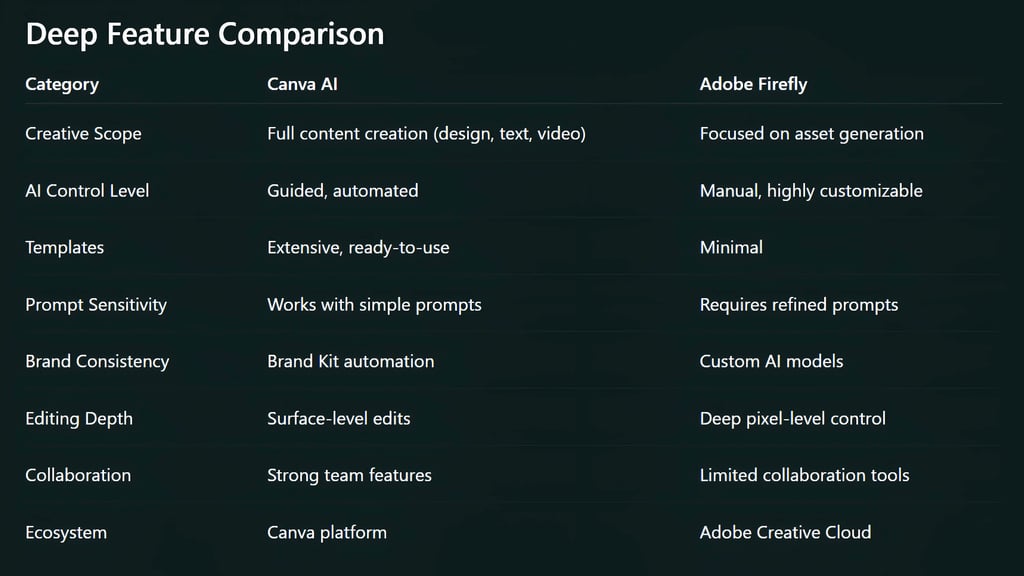


Strategic Insight: Which One Should You Actually Use?
Instead of choosing one, many creators are combining both tools strategically:
Use Canva AI for:
Fast drafts
Social media content
Bulk design creation
Use Adobe Firefly for:
Final visuals
High-end assets
Detailed editing
This hybrid workflow gives you both speed and quality.
Future Trends to Watch
Canva is moving toward more advanced AI editing and automation
Adobe is investing heavily in video AI and custom model training
AI-generated video and real-time design will become standard
Brand-specific AI models will reshape how companies create content
The competition is pushing both platforms to improve rapidly.
Canva AI (Magic Studio) and Adobe Firefly are not direct replacements. They are different types of tools built for different kinds of creators. If your goal is fast, efficient content creation, Canva AI is the better choice. If your goal is precision, realism, and creative control, Adobe Firefly stands out. The real advantage comes from understanding when to use each.
FAQ's
Q: Which is better, Canva AI or Adobe Firefly?
It depends on your needs. Canva AI is better for quick, easy content creation, while Adobe Firefly is better for high-quality visuals and advanced design control.
Q: Is Canva AI good enough for professional design work?
Canva AI can handle many professional tasks like social media, presentations, and marketing designs. However, for advanced editing, branding precision, and complex visuals, Adobe Firefly offers more control.
Q: Can Adobe Firefly replace Canva AI?
Not completely. Adobe Firefly focuses mainly on asset generation and advanced editing, while Canva AI provides a full content creation ecosystem, including templates, writing tools, and publishing features.
Q: Which AI tool is better for beginners?
Canva AI is significantly more beginner-friendly. Its drag-and-drop interface and simple prompts make it easy for anyone to start creating without prior design experience.
Q: Does Adobe Firefly produce better images than Canva AI?
In most cases, yes. Adobe Firefly generates more realistic, detailed, and customizable visuals, especially for professional use.
Q: Is Canva AI free to use?
Yes, Canva offers a free plan with access to basic AI tools. More advanced features are available in the Pro subscription.
Q: Is Adobe Firefly free or paid?
Adobe Firefly offers limited free credits. Full access typically requires a paid Adobe Creative Cloud subscription.
Q: Which tool is better for social media content creation?
Canva AI is the better choice for social media because of its templates, speed, and built-in publishing tools.
Q: Can I use Canva AI and Adobe Firefly together?
Yes, and many creators do. Canva AI is often used for fast content creation, while Adobe Firefly is used for refining visuals and producing high-quality assets.
Q: Which AI tool is better for branding and business use?
Adobe Firefly is stronger for branding due to its custom model capabilities and higher design control. Canva AI is still useful for maintaining consistency through its Brand Kit features.
Q: Does Adobe Firefly support commercial use?
Yes, Adobe Firefly is designed with commercially safe outputs and is trained on licensed datasets, making it suitable for business use.
Q: What are the main limitations of Canva AI compared to Adobe Firefly?
Canva AI has limited fine control over design elements and less advanced editing capabilities compared to Adobe Firefly’s deep, professional tools.
Subscribe to Frontier Intelligence
All © Copyright reserved by Accessible-Learning Hub
Accessible Learning Hub — Actionable clarity for high-agency minds.
Weekly breakdowns on AI breakthroughs, capital flow, and human performance systems. Zero fluff.